Passwords and PINs
A familiar secret
Avery opens the staff portal for Cedar Inc. and enters a password. The service checks it against the password set for Avery's account. A match shows that the person signing in knows the password. It cannot show whether anyone else knows it too.
Avery can use that password on a different device without bringing anything along. But the password can also be copied, reused on another site, or typed into a page that only looks like the staff portal.
Checking a password
A password is one of the shared secrets described in Secrets and key pairs, but the service does not need to keep the shared value itself. Avery sends the password at each sign-in, so the service only has to recognize it.
When Avery sets a password, the service creates a random value called a salt for that password record. It gives both the password and the salt to a password-hashing function designed to be slow. The service stores the resulting hash, the salt, and the settings needed to check the password later. It does not keep a readable copy of the password.
If Avery and another employee choose the same password, each record gets a different salt, so their stored hashes differ. The salt can be stored alongside the hash because its job is to make each record's calculation different, not to serve as another secret. The slow hashing function makes each guess more expensive if someone steals the records.
At sign-in, the service repeats the calculation. It runs the password Avery entered through the same function, with the stored salt and settings, and compares the result with the stored hash. Hashing works in one direction only, so nothing is decrypted and the original password is never recovered.
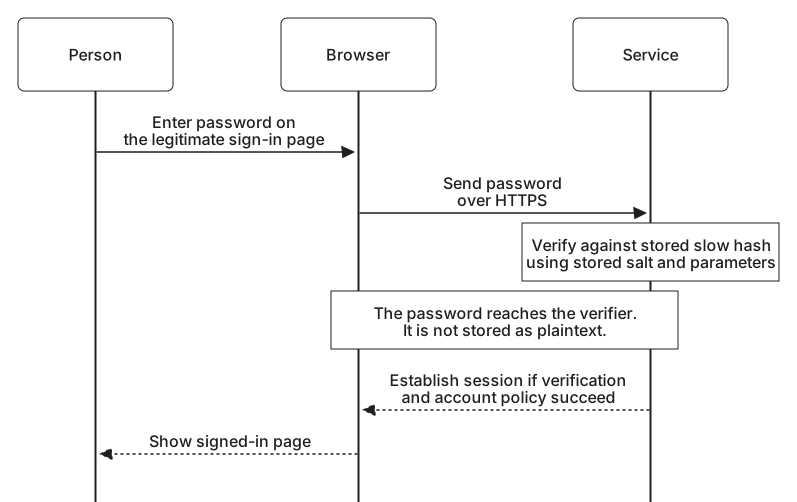
In simplified pseudocode, the check looks like this:
record = load_account_password_record(account_id)
accepted = password_library.verify(record, supplied_password)
if accepted and account_is_allowed_to_sign_in:
    establish_session()
else:
    reject_sign_in()
Where passwords fail
Someone can try passwords repeatedly at the staff portal's sign-in page. The service can limit those online attempts. If its password database is stolen, guesses can instead be tested against the copied hashes without visiting the sign-in page. Slow, salted hashing raises the cost of those guesses, but a weak password may still be found.
Reuse creates another path into Avery's account. If Avery chose the same password for work and a shopping site, a breach at the shopping site could expose a working password for the staff portal. Trying exposed account names and passwords at other services is called credential stuffing.
Phishing does not require guessing or a stolen password database. Someone makes a page that looks like the staff portal's sign-in page and persuades Avery to enter the password there. The person running that page receives the password, even if Avery chose a strong one.
A unique work password keeps a shopping-site breach from revealing the same secret, and a password manager helps Avery keep every password distinct.
Cedar Inc. might be tempted to add familiar rules: at least one capital letter, digit, and symbol, and a new password every 90 days. Those rules do little against these attacks. They tend to produce predictable patterns such as Summer2026!, and scheduled changes push people toward small, guessable edits of the old password.
Current NIST guidance, SP 800-63B-4, asks for length instead: at least 15 characters when a password is the only factor, or at least 8 when it is combined with another factor. It tells services to accept long passphrases, allow pasting so password managers work, and reject new passwords that appear on lists of breached or commonly used values. A password should be changed when there is evidence it has been exposed, not on a schedule.
A PIN on your device
Now Avery signs in with a security key. Avery inserts it and enters a PIN when prompted. The security key checks the PIN locally before using its cryptographic key to produce a signed response. Cedar Inc. verifies that response; it never receives the PIN.
The security key can limit repeated PIN guesses because it controls the check. A short code that a website receives and checks itself works differently, even if the form also calls it a PIN.
Those website-checked codes are the subject of the next lesson, Codes, links, and approval prompts, along with sign-in links and app approvals. Each adds something a password cannot provide, and each has its own way of failing.