Giving another application limited access
The participants
Our photo book example introduces four OAuth roles:
- Resource owner: you, as the person able to authorize access to the photos.
- Client: the printing application requesting access.
- Authorization server: the service that handles authorization and issues access tokens.
- Resource server: the photo API that accepts valid tokens and protects the photos.
The authorization server and photo API may belong to the same company, but their responsibilities are distinct. One issues the token; the other decides whether a request using it is allowed.
Following the permission
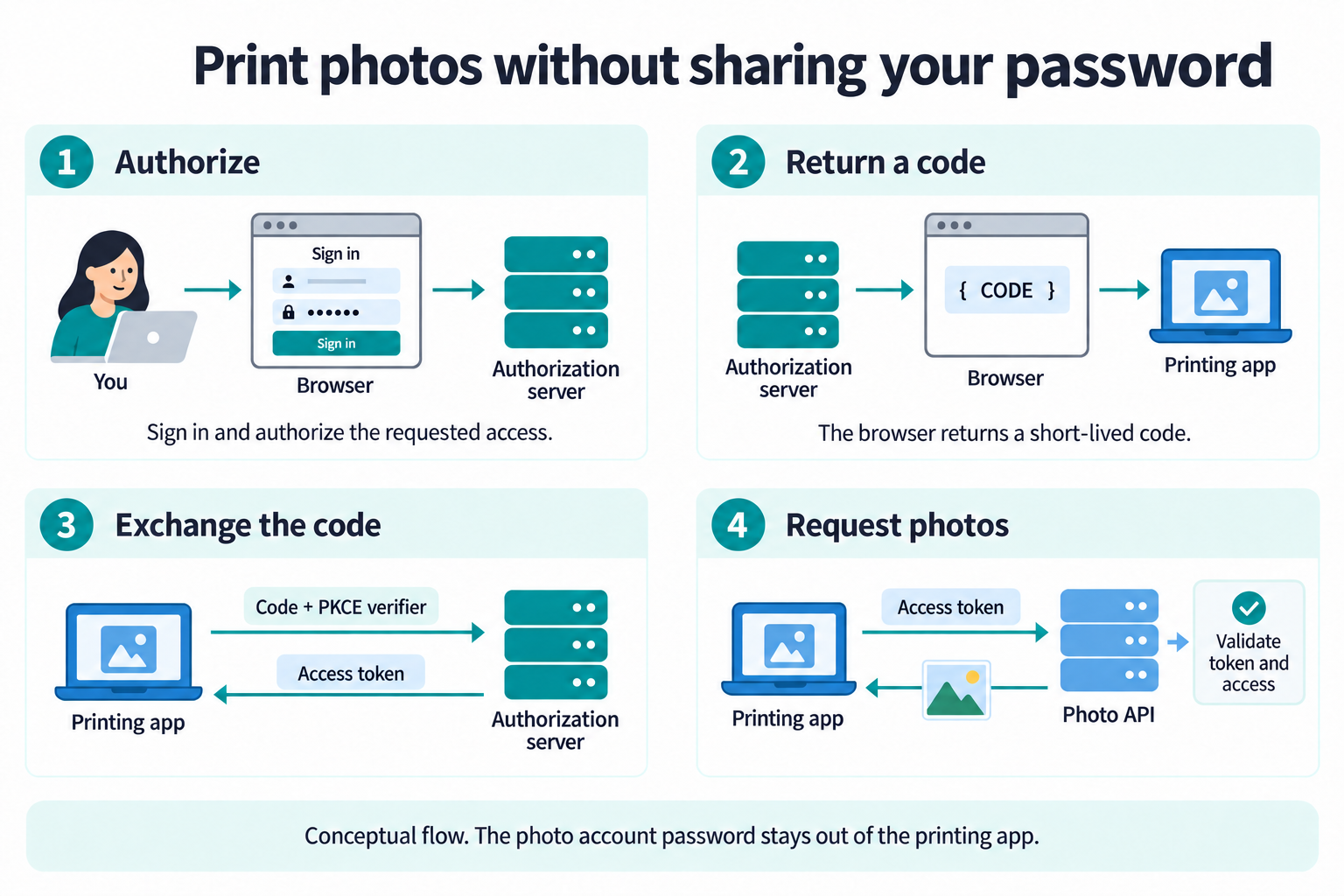
In an authorization code flow, the printing application sends your browser to the authorization server. That service handles any required sign-in and authorization. It returns a short-lived authorization code to the application's registered return address, called a redirect URI. The application then sends the code directly to the authorization server's token endpoint, the address where clients exchange a code for tokens, without passing back through the browser.
That is the outline, not a complete implementation. Protections include strict redirect URI validation and Proof Key for Code Exchange (PKCE), which ties the code exchange to a secret created for that authorization attempt.
Using limited access
The printing application presents an access token when calling the photo API. A simplified request might look like this. The value is a placeholder and the example does not make a live request.
GET /api/albums/42/photos HTTP/1.1
Host: photos.example
Authorization: Bearer EXAMPLE_ACCESS_TOKEN
A bearer token can be used by whoever possesses it, so protecting it matters. The API must validate the token and determine whether it permits this operation on this album.
A scope describes an area of access, such as a fictional
photos.read permission. Scope names and their meaning are
defined by the service. A read scope does not automatically limit access
to one album. That restriction needs to be represented and enforced by
the service's authorization design.
An access token has a limited lifetime. Some clients also receive a refresh token to request new access tokens from the authorization server. It is not sent to the photo API. Removing a grant or revoking a refresh token does not necessarily make every previously issued access token unusable immediately; enforcement depends on how the service checks tokens and revocation.
Connecting OAuth and OpenID Connect
OAuth addresses access to resources. If the printing application also wants to sign you in using an existing account, it needs an authentication protocol. OpenID Connect (OIDC) adds that layer to OAuth 2.0. Its ID token tells the client about the authenticated subject; an access token serves the different purpose of authorizing API access. The two are not interchangeable.
Not every OAuth interaction represents a person. A background service, such as the printing application's scheduled job that sends each day's finished photo books to a print lab, can request a token using its own credentials. OAuth calls this the client credentials grant: the client authenticates at the authorization server's token endpoint and receives access granted to the application itself, with no user involved.
You now have the foundations the rest of the course builds on: identities, authentication, authorization, requests, sessions, and trust. The Identity and trust lessons come next and look more closely at the evidence underneath these exchanges: how a person is proofed, and how secrets, keys, and certificates work. Continue to What proofing establishes to follow a clinic deciding whether a new portal account really belongs to one of its patients.
The printing application returns after the Authentication methods lessons and History of SSO. The OAuth 2.0 lessons, starting with The problem OAuth solves, build this exchange step by step with complete requests and responses, and the OpenID Connect lessons show how a client requests and validates an ID token.