Creating a DPoP proof
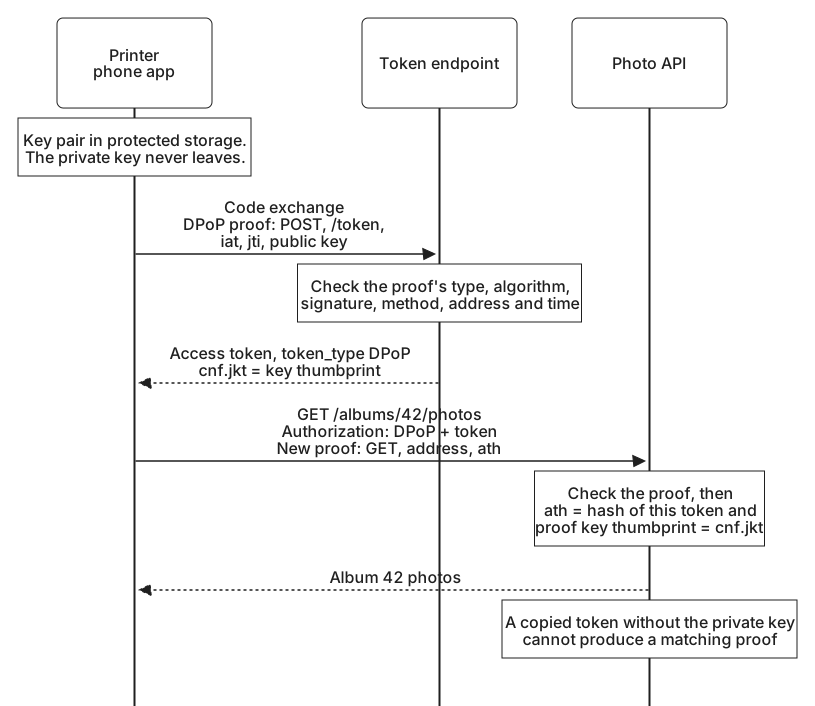
A DPoP-bound token never travels alone. Each request that uses it carries a second, short-lived JWT beside it: a proof, signed with the app's private key, that describes this one request. It names the method, the address, the moment it was made, and, at an API, the token it accompanies.
The printer's phone app makes two proofs in the course of connecting your account and showing your first album. One goes to the token endpoint with the code exchange. The other goes to the photo API with the new access token. Following both shows what a proof contains and why.
The proof at the token endpoint
All domains, codes, and tokens in these examples are fictional. A proof is a JWT like any other, with a header and a set of claims. Decoded, the proof the app sent with its code exchange reads:
Header:
{
  "typ": "dpop+jwt",
  "alg": "ES256",
  "jwk": {
    "kty": "EC",
    "crv": "P-256",
    "x": "DboN9G_lcWgZ3rxckKu35JwH2OYBLWJgxcT_-KEXK8Y",
    "y": "rj69LkdPmdnAbPoBq6mpcpbJPWLEQ6Qs2SaMMyKWBSk"
  }
}

Claims:
{
  "jti": "demo-proof-1",
  "htm": "POST",
  "htu": "https://auth.photos.example/token",
  "iat": 1790845200
}
The header does more work than usual. typ is dpop+jwt, an explicit type that keeps a proof from being mistaken for any other kind of JWT, and any other JWT from being accepted as a proof. alg names an asymmetric signature algorithm. It can never be none, and never a shared-key algorithm such as HMAC, because the whole point is that only the app can sign. jwk carries the app's public key, the same one shown in Binding a token to a key, and must never include private key members.
The claims describe the request:
jtiis a unique identifier for this proof. A real one is random, for example at least 96 bits of random data or a random UUID. The readable value here stands in for it.htmis the HTTP method of the request, herePOST.htuis the address the request is sent to, without any query string or fragment.iatis when the proof was created: 1790845200 is 09:00:00 UTC on 1 October 2026.
The app encodes the header and claims, signs them with its private key, and sends the result in the DPoP header of the token request, as the previous lesson showed. The value begins with the encoded header, eyJ0eXAiOiJkcG9wK2p3dCIsImFsZyI6IkVTMjU2Iiwiandr..., and ends with the signature.
Notice what the proof does not contain. There is no client secret, no authorization code, and nothing from the request body. A proof signs only the method, the address, the time, and a unique identifier, which keeps it simple to build and check. The rest of the request is protected by TLS, as always.
The proof at the photo API
Twelve seconds later, the app asks for the photos in album 42. The request carries the access token in the Authorization header, now with the DPoP scheme in place of Bearer, and a new proof:
GET /albums/42/photos HTTP/1.1
Host: api.photos.example
Authorization: DPoP demo-app-access-token-1
DPoP: eyJ0eXAiOiJkcG9wK2p3dCIsImFsZyI6IkVTMjU2IiwiandrIjp7Imt0eSI6IkVDIiwiY3J2IjoiUC0yNTYi...
The proof's header is identical, because the key is the same. Its claims are new:
{
  "jti": "demo-proof-2",
  "htm": "GET",
  "htu": "https://api.photos.example/albums/42/photos",
  "iat": 1790845212,
  "ath": "xcbjgyKf_F3-foHYAOd_VdSpNEB0ThBmPo1xXGoYihA"
}
Every claim has changed. The identifier is new, the method and address are those of this request, and the time is 09:00:12. If the app had asked for /photos?page=2, the htu would be https://api.photos.example/photos, because the query string is left out.
The new claim, ath, is a hash of the access token sent with the proof, and it is required whenever a proof accompanies an access token. It ties this proof to this token. Without it, a proof made for one request could be paired with a different token held by the same app, for example one issued for a second photo account. With it, a proof is useless without its token, and the token is useless without a proof that names it.
Computing the hashes
Two values in these examples are hashes, and both are easy to get subtly wrong.
The thumbprint in the token's cnf.jkt is computed from the public key alone. For an elliptic curve key, take only the four required members, crv, kty, x, and y, write them as JSON in that alphabetical order with no spaces or line breaks, hash the bytes with SHA-256, and encode the result as Base64url without padding:
Canonical JSON:
{"crv":"P-256","kty":"EC","x":"DboN9G_lcWgZ3rxckKu35JwH2OYBLWJgxcT_-KEXK8Y","y":"rj69LkdPmdnAbPoBq6mpcpbJPWLEQ6Qs2SaMMyKWBSk"}

jkt = BASE64URL(SHA-256(canonical JSON))
    = BVohHgHi0D9O5iBFRpVSFAukBjzgVbIRUjYuTsfJER8
The ath claim is computed from the access token: the SHA-256 hash of the exact token string, encoded the same way. Here that string is demo-app-access-token-1. For a real JWT access token it is the whole encoded token, exactly as the app received it.
In TypeScript on Node.js, both take a few lines:
import { createHash } from 'node:crypto';

const sha256url = (text: string) =>
  createHash('sha256').update(text, 'utf8').digest('base64url');

// jwk is the app's public key, as shown above
// JWK thumbprint: required members only, in this order, no whitespace
const jkt = sha256url(JSON.stringify({ crv: jwk.crv, kty: jwk.kty, x: jwk.x, y: jwk.y }));

// Access token hash for the ath claim
const ath = sha256url('demo-app-access-token-1');
// ath === 'xcbjgyKf_F3-foHYAOd_VdSpNEB0ThBmPo1xXGoYihA'
Node's base64url encoding already leaves out the padding. The common mistakes are all small: adding kid or alg to the thumbprint input, letting a JSON library reorder or indent the members, hashing the whole Authorization header instead of the token, or encoding with ordinary Base64. Each one produces a value that looks plausible and never matches.
Each proof is cheap to make and narrow in what it allows: one request, at one moment, from one key. Holding it to exactly that is the job of the servers that receive it.