SCIM requests and responses
Creating a user
On Monday 26 October, a week before Dana Okafor's start date, the identity system's provisioning service creates Dana's patient records account. Over the following weeks the same client tells the records system about Sam Reyes's move to oncology and Dr. Lee Moreau's departure. Each change is one HTTP request to the records system's SCIM API, and each response says what happened.
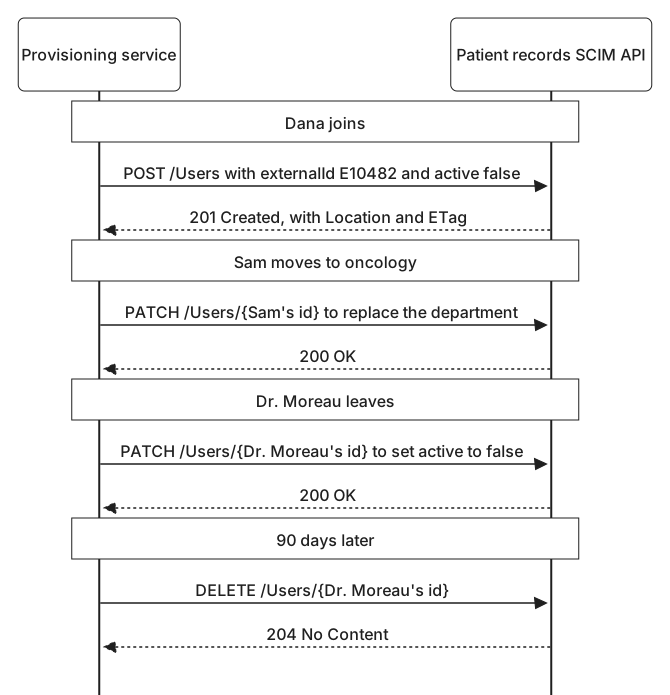
A new user is created by sending it to the /Users collection with POST:
POST /scim/v2/Users HTTP/1.1
Host: records.harborclinic.example
Authorization: Bearer demo-provisioning-token-7
Content-Type: application/scim+json

{
  "schemas": [
    "urn:ietf:params:scim:schemas:core:2.0:User",
    "urn:ietf:params:scim:schemas:extension:enterprise:2.0:User"
  ],
  "externalId": "E10482",
  "userName": "dana.okafor",
  "name": { "givenName": "Dana", "familyName": "Okafor" },
  "displayName": "Dana Okafor",
  "emails": [
    { "value": "[email protected]", "type": "work", "primary": true }
  ],
  "active": false,
  "urn:ietf:params:scim:schemas:extension:enterprise:2.0:User": {
    "employeeNumber": "E10482",
    "department": "Pediatrics"
  }
}
All names, hosts, identifiers, and tokens in these examples are fictional.
The bearer token came from the client credentials grant, as Getting accounts into applications described. The body uses the shapes from SCIM users, groups, and schemas: the schemas list, the client's own key in externalId, the core attributes, and the department in the enterprise extension. Two details are deliberate. There is no id, because the records system assigns it. And active is false, so the account exists but cannot be used until Dana starts.
The records system answers:
HTTP/1.1 201 Created
Content-Type: application/scim+json
Location: https://records.harborclinic.example/scim/v2/Users/a3f1c9e2-58d4-4b7e-9c61-2e7d0b4f8a15
ETag: W/"1"

{
  "id": "a3f1c9e2-58d4-4b7e-9c61-2e7d0b4f8a15",
  "externalId": "E10482",
  "userName": "dana.okafor",
  "active": false,
  "meta": {
    "resourceType": "User",
    "created": "2026-10-26T09:14:05Z",
    "lastModified": "2026-10-26T09:14:05Z",
    "location": "https://records.harborclinic.example/scim/v2/Users/a3f1c9e2-58d4-4b7e-9c61-2e7d0b4f8a15",
    "version": "W/\"1\""
  }
}
201 Created confirms the new user. Location gives its address, which ends in the new id, and ETag gives its current version. The full body returns the whole user as stored. This excerpt shows only the parts that matter to the client now. The provisioning service stores the id with Dana's identity record, and just after midnight on 2 November it sends a small update that sets active to true.
A create can also be refused. Suppose an administrator had already created a dana.okafor account by hand, so that Dana could attend an orientation session. The records system would not create a second user with the same user name:
HTTP/1.1 409 Conflict
Content-Type: application/scim+json

{
  "schemas": ["urn:ietf:params:scim:api:messages:2.0:Error"],
  "status": "409",
  "scimType": "uniqueness",
  "detail": "userName is already in use."
}
Errors have their own message schema. status repeats the HTTP status as a string, scimType gives a reason a program can act on, and detail is for people. A uniqueness conflict is not something to retry, or to work around by adding a digit to the name. It means an account exists that the identity system did not create, and a person needs to decide whether it is Dana's. The first step is finding out what holds the name.
Finding users
The client searches with a filter in the query string:
GET /scim/v2/Users?filter=userName%20eq%20%22dana.okafor%22&attributes=userName,externalId,active HTTP/1.1
Host: records.harborclinic.example
Authorization: Bearer demo-provisioning-token-7
Decoded, the filter reads userName eq "dana.okafor". Spaces and double quotes cannot appear as they are in a URL, so they are percent-encoded as %20 and %22. The attributes parameter asks for only the attributes the client needs, plus any, such as id, that are always returned.
HTTP/1.1 200 OK
Content-Type: application/scim+json

{
  "schemas": ["urn:ietf:params:scim:api:messages:2.0:ListResponse"],
  "totalResults": 1,
  "startIndex": 1,
  "itemsPerPage": 1,
  "Resources": [
    {
      "id": "0b7d3e5f-9a2c-4d18-8e6b-1f4c7a9d2e30",
      "userName": "dana.okafor",
      "active": true
    }
  ]
}
A search always returns a ListResponse. totalResults counts every match, and Resources holds the matches in this response. A search that matches nothing is not an error: it returns 200 OK with totalResults of 0.
This account has no externalId, which confirms that the identity system did not create it, and it is already active, a week before Dana starts. The provisioning service stops and reports it to Morgan Hale, who owns access to patient records. If the account turns out to be Dana's, the identity system can take it over by setting its externalId and bringing its access in line with Dana's rules. Otherwise it is removed.
Filters can do much more than test one name for equality:
| Operator | Meaning | Example |
|---|---|---|
eq | Equals | externalId eq "E10482" |
ne | Does not equal | userType ne "Employee" |
co | Contains | displayName co "Reyes" |
sw | Starts with | userName sw "dana." |
ew | Ends with | emails.value ew "@harborclinic.example" |
pr | Has a value | externalId pr |
gt, ge, lt, le | Greater than, greater or equal, less than, less or equal | meta.lastModified gt "2026-11-01T00:00:00Z" |
Expressions combine with and, or, and not, with parentheses for grouping. active eq true and not (externalId pr) finds active accounts that no client has claimed, which is a useful search for accounts like the one above. Square brackets filter inside a multi-valued attribute: emails[type eq "work" and value ew "@harborclinic.example"] matches users whose work address is a clinic address.
A search can also match far more users than one response should carry. The client asks for pages with startIndex, the position of the first result it wants, counting from 1, and count, the most results it wants in the page:
GET /scim/v2/Users?startIndex=1&count=100 HTTP/1.1
GET /scim/v2/Users?startIndex=101&count=100 HTTP/1.1
GET /scim/v2/Users?startIndex=201&count=100 HTTP/1.1
The first response reports a totalResults of 274, a startIndex of 1, and an itemsPerPage of 100, so the client knows to ask twice more. A service may return fewer results than requested, and never more than the maxResults in its configuration, so the client keeps going until it has seen every match. Pages are not a snapshot. If users are created or removed while the client is paging, one can shift between pages and be seen twice or missed.
Filters put values such as user names into URLs, and URLs tend to end up in server and proxy logs. A client can send the same search in a request body instead, with POST to /Users/.search.
Changing a user
Early on Monday 9 November, Sam Reyes moves from pediatrics to oncology. The records system needs Sam's department changed, and SCIM offers two ways to do it.
PUT replaces the whole resource. The client sends the complete user as it should now be, and the records system replaces what it holds. Attributes the client leaves out may be cleared. If the identity system built a PUT from HR's fields alone, it could erase anything the records team had added to Sam's account, such as a ward phone number. PUT suits a client that owns every attribute of a resource. Harbor's provisioning service does not.
PATCH changes only what it names:
PATCH /scim/v2/Users/5b9e2d70-1c3f-4a86-b2d9-7e4f0c6a1d38 HTTP/1.1
Host: records.harborclinic.example
Authorization: Bearer demo-provisioning-token-7
Content-Type: application/scim+json

{
  "schemas": ["urn:ietf:params:scim:api:messages:2.0:PatchOp"],
  "Operations": [
    {
      "op": "replace",
      "path": "urn:ietf:params:scim:schemas:extension:enterprise:2.0:User:department",
      "value": "Oncology"
    }
  ]
}
The body uses the PatchOp message schema and a list of Operations. Each operation has an op, which is add, replace, or remove; a path, which says what to change; and, for add and replace, a value. The records system applies the operations in order and treats the request as a single change: if any operation fails, none of them is applied. Sam's manager changes with the move too, which would be another operation in the same list.
The path here names an attribute in the enterprise extension, so it starts with the extension's URN followed by a colon. Core attributes need no prefix, and a dot reaches into a complex attribute, as in name.familyName. For a multi-valued attribute, a filter in square brackets picks out the value to change. When Dana later changes surname to Mensah, one operation in that update replaces only the work email address:
{
  "op": "replace",
  "path": "emails[type eq \"work\"].value",
  "value": "[email protected]"
}
Inside a JSON string, the filter's own double quotes are escaped with backslashes. For Sam's move, the records system answers:
HTTP/1.1 200 OK
Content-Type: application/scim+json
ETag: W/"8"
The body, left out here, holds the full updated user, so the client can confirm the change took effect, and the new ETag identifies the new version. Some services answer a successful PATCH with 204 No Content and no body instead. Both mean success.
Changing group membership
Sam's department is only a description. What lets Sam read oncology records is membership in the Oncology nurses group, which grants EHR_ONC_RW. A user's groups attribute is read-only, so the identity system changes the group, adding Sam the same morning:
PATCH /scim/v2/Groups/f7c3e1a9-2d6b-4e84-b0f5-1a8c4d7e9b26 HTTP/1.1
Host: records.harborclinic.example
Authorization: Bearer demo-provisioning-token-7
Content-Type: application/scim+json

{
  "schemas": ["urn:ietf:params:scim:api:messages:2.0:PatchOp"],
  "Operations": [
    {
      "op": "add",
      "path": "members",
      "value": [{ "value": "5b9e2d70-1c3f-4a86-b2d9-7e4f0c6a1d38" }]
    }
  ]
}
The member's value is Sam's id in the records system. Adding a member who is already present changes nothing and still succeeds, so this request is safe to repeat.
Sam keeps pediatric access for a two-week handover, which ends on 23 November, as Changing jobs described. That morning, the identity system removes Sam from Pediatrics nurses:
PATCH /scim/v2/Groups/e2a6b8d4-7c1f-4f39-a5e0-9b3d2c8f6a71 HTTP/1.1
Host: records.harborclinic.example
Authorization: Bearer demo-provisioning-token-7
Content-Type: application/scim+json

{
  "schemas": ["urn:ietf:params:scim:api:messages:2.0:PatchOp"],
  "Operations": [
    {
      "op": "remove",
      "path": "members[value eq \"5b9e2d70-1c3f-4a86-b2d9-7e4f0c6a1d38\"]"
    }
  ]
}

HTTP/1.1 204 No Content
The filter in the path selects exactly one member to remove. Returning a large group after every change would be slow, which is why the records system answers group changes with 204 No Content.
Repeating a removal is less predictable than repeating an addition. The second time, the filter matches nobody. Some services answer with success, and others with 400 Bad Request and the scimType noTarget, meaning the path selected nothing to change. A client that sent the removal twice, for example after a timeout, reads the group, confirms that Sam is no longer a member, and records the removal as done rather than as a failure.
A client could instead replace the whole members list with a new one. Harbor avoids that. It only works if the client's list is perfect, and anyone the client does not know about, such as a member added under an approved exception, would be removed without anyone deciding to remove them. Adding and removing named members changes only what the client intends to change.
Deactivating and deleting
Dr. Moreau's contract ends at 18:00 on Friday 27 November. At 18:02 the provisioning service sends:
PATCH /scim/v2/Users/c8d47a1e-3f92-4e5b-8a0c-6d1b9f2e7c54 HTTP/1.1
Host: records.harborclinic.example
Authorization: Bearer demo-provisioning-token-7
Content-Type: application/scim+json

{
  "schemas": ["urn:ietf:params:scim:api:messages:2.0:PatchOp"],
  "Operations": [
    { "op": "replace", "path": "active", "value": false }
  ]
}
The records system answers 200 OK, and the user now shows "active": false. What that means is up to each application. In Harbor's records system it blocks sign-in, ends the session on the emergency department workstation, and revokes the refresh token held by the records mobile app, which Leaving an organization showed is as important as stopping new sign-ins.
Deactivation keeps everything else. The account, its history, and its id remain, so an investigation can still trace what the account did, and anything Dr. Moreau owned can be handed to someone else. If the contract had been extended at the last minute, enabling the account again would be one more small update.
Deletion comes later. Harbor keeps disabled accounts for 90 days, and then the provisioning service sends:
DELETE /scim/v2/Users/c8d47a1e-3f92-4e5b-8a0c-6d1b9f2e7c54 HTTP/1.1
Host: records.harborclinic.example
Authorization: Bearer demo-provisioning-token-7

HTTP/1.1 204 No Content
From then on, every request for that id gets 404 Not Found:
HTTP/1.1 404 Not Found
Content-Type: application/scim+json

{
  "schemas": ["urn:ietf:params:scim:api:messages:2.0:Error"],
  "status": "404",
  "detail": "Resource not found."
}
Whether DELETE erases the account or only hides it is up to the service. SCIM only requires that the id behaves as though the resource is gone. Either way, deleting the account does not delete the records system's history of who opened which patient record, which has its own retention rules and must outlive the account. Nor does it touch Dr. Moreau's identity in the identity system, which keeps the record of who Dr. Moreau was and what access they held.
A leaver process uses both requests, in that order: active set to false at departure, DELETE after the retention period. Deleting first throws away what an investigation might need. Never deleting leaves a growing list of disabled accounts that someone has to explain in every review.
Conflicts and errors
Two writers can collide, and collisions do the most damage with PUT, so consider a client that uses it. A week after Sam's move, at 08:00, it reads Sam's user and gets version W/"8". At 08:05, someone on the records team adds a ward phone number to Sam's account, which becomes W/"9". At 08:06 the client sends a PUT built from what it read at 08:00, which has no phone number. Applied as sent, it would silently erase the number.
The If-Match header prevents that. The client sends the version it read, and the service applies the request only if the resource is still at that version:
PUT /scim/v2/Users/5b9e2d70-1c3f-4a86-b2d9-7e4f0c6a1d38 HTTP/1.1
Host: records.harborclinic.example
Authorization: Bearer demo-provisioning-token-7
Content-Type: application/scim+json
If-Match: W/"8"

{
  "schemas": [
    "urn:ietf:params:scim:schemas:core:2.0:User",
    "urn:ietf:params:scim:schemas:extension:enterprise:2.0:User"
  ],
  "externalId": "E07731",
  "userName": "sam.reyes",
  "name": { "givenName": "Sam", "familyName": "Reyes" },
  "displayName": "Sam Reyes",
  "emails": [
    { "value": "[email protected]", "type": "work", "primary": true }
  ],
  "active": true,
  "urn:ietf:params:scim:schemas:extension:enterprise:2.0:User": {
    "employeeNumber": "E07731",
    "department": "Oncology"
  }
}
HTTP/1.1 412 Precondition Failed
Content-Type: application/scim+json
{
"schemas": ["urn:ietf:params:scim:api:messages:2.0:Error"],
"status": "412",
"detail": "The resource has changed since the version supplied."
}412 Precondition Failed means the user has changed since the client read it. The right response is to read the user again, which returns W/"9" and the phone number, apply the intended change to that current version, and send it again with If-Match: W/"9". Removing the header to force the write through would discard someone else's change without anyone deciding to. If-Match works the same way on PATCH and DELETE.
Every SCIM error uses the same error schema as the earlier conflict, and for 400 and 409 responses, scimType narrows down the cause:
| Status and scimType | Typical cause |
|---|---|
400 invalidFilter | A filter with a syntax error, such as a missing closing quote |
400 tooMany | A filter that would match more results than the service is willing to process, such as userName pr on its own |
400 invalidPath | A PATCH path that names no valid attribute, such as a misspelled department |
400 noTarget | A PATCH path whose filter matches nothing, such as removing a member who has already been removed |
400 invalidValue | A required value that is missing, or a value of the wrong type, such as "active": "no" |
400 mutability | An attempt to change a read-only or immutable attribute, such as a PATCH that replaces id |
409 uniqueness | A userName that another user already holds |
412, no scimType | An If-Match version that is no longer current |
Problems with the token itself produce 401 Unauthorized when it is missing or expired, and 403 Forbidden when the client is not allowed to do what it asked, such as a client holding only scim.read trying to add a group member. A client should decide what to do from status and scimType, keep detail for the people reading its records, and record every error against the change that caused it.
Continue to Keeping systems in sync to see what the provisioning service does when a request gets no answer at all.