Requesting access to multiple resources
After printing your book, the printer offers to send a preview of album 42 to the people you choose. As the Scopes and audiences lesson described, that needs two APIs: the photo API with photos.read, and the sharing API with shares.create. That lesson also sketched the answer: name both APIs when you authorize, then one API at a time at the token endpoint.
Resource indicators turn that sketch into a concrete exchange. You approve once, and the printer ends up with a separate token for each API.
One token for each API
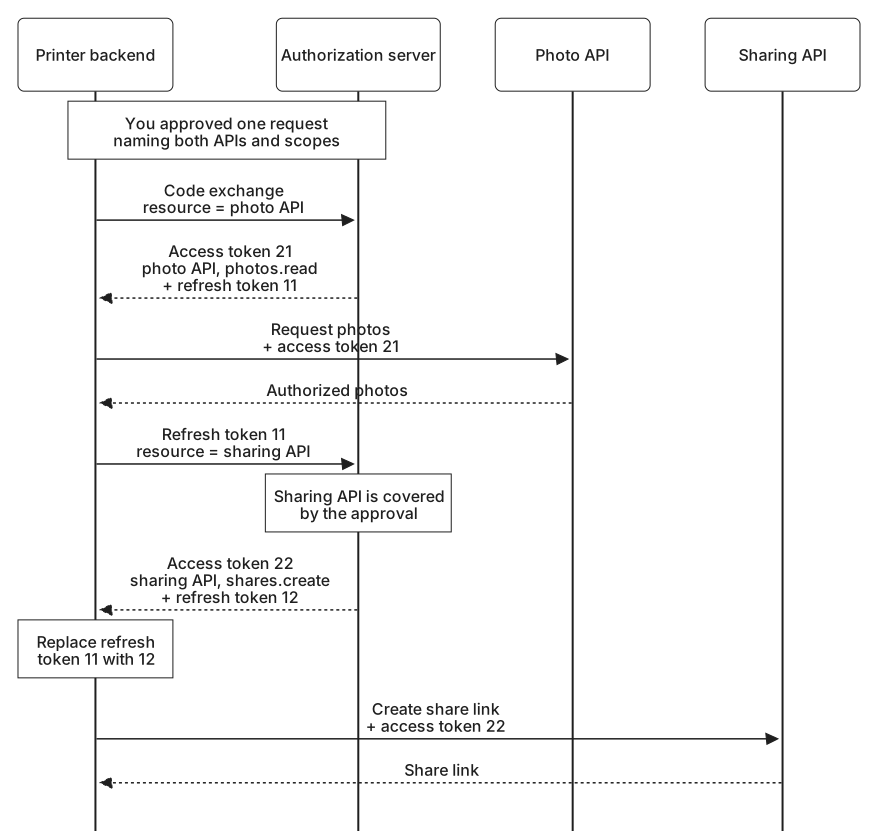
The authorization covers two APIs, but the printer asks for its access tokens one API at a time. When it exchanges the code, it names only the photo API:
POST /token HTTP/1.1
Host: auth.photos.example
Authorization: Basic cGhvdG8tcHJpbnRlcjpkZW1vLW9ubHktbm90LWEtcmVhbC1zZWNyZXQ=
Content-Type: application/x-www-form-urlencoded

grant_type=authorization_code
&code=demo-code-21
&redirect_uri=https%3A%2F%2Fprinter.example%2Foauth%2Fcallback
&code_verifier=demo_verifier_for_the_two_api_attempt_21_2026
&resource=https%3A%2F%2Fapi.photos.example
The printer authenticates with its usual Basic header. The response carries a token for the photo API and a refresh token:
{
  "access_token": "demo-access-token-21",
  "token_type": "Bearer",
  "expires_in": 600,
  "refresh_token": "demo-refresh-token-11",
  "scope": "photos.read"
}
The access token's audience is the photo API alone, and the server has reduced its scope to photos.read, because shares.create means nothing at the photo API. Narrowing a token's scope to what its recipient needs is sometimes called downscoping. It also protects your privacy: the photo API does not learn from the token which other services you use. Because the granted scope differs from the one requested, the response says so in its scope field.
The refresh token is different. It stays tied to the whole authorization, both resources and both scopes. When you choose to send the preview, the printer uses it to ask for a token for the sharing API:
POST /token HTTP/1.1
Host: auth.photos.example
Authorization: Basic cGhvdG8tcHJpbnRlcjpkZW1vLW9ubHktbm90LWEtcmVhbC1zZWNyZXQ=
Content-Type: application/x-www-form-urlencoded

grant_type=refresh_token
&refresh_token=demo-refresh-token-11
&resource=https%3A%2F%2Fshare.photos.example
{
"access_token": "demo-access-token-22",
"token_type": "Bearer",
"expires_in": 600,
"refresh_token": "demo-refresh-token-12",
"scope": "shares.create"
}The new access token is for the sharing API and carries only shares.create. The photo service rotates refresh tokens, so the printer saves demo-refresh-token-12 in place of demo-refresh-token-11 before doing anything else, as The refresh token grant lesson described. The next token for either API comes from the new refresh token.
Why not one token for both
A token request may include several resource values, and a server could answer with one token whose audience lists both APIs. The Scopes and audiences lesson explained the danger: a token valid at both APIs lets a leak at the sharing API expose your photo library. The resource indicators specification takes the same view. It encourages clients to name a single resource in each token request, warns that any API in a token's audience can use it at the others, and lets a server refuse requests that name more than one.
Scopes get harder to interpret as well. A request that names several resources and several scopes asks for every scope at every resource. photos.read has no meaning at the sharing API, and every scope in a JWT access token must mean something to the APIs in its audience. A server may reject a combination of resources and scopes it cannot make sense of with the error invalid_target.
Naming more than one resource in the authorization request has none of these problems. It describes what you approve, and no token is ever valid at both APIs.
Keeping tokens apart
The printer now holds two access tokens and one refresh token. It stores each access token with the API it was issued for and sends each one only to that API. When one expires, it refreshes with that API's resource value and replaces only that token.
Both APIs share the same refresh token, so the rule from The refresh token grant lesson still applies: only one refresh for the connection runs at a time, even when the photo token and the sharing token need replacing at the same moment.
The refresh token cannot reach further than the authorization behind it. If the printer later asked for a token for an API you never approved, the photo service would refuse, because its policy limits token requests to the resources you approved, or some of them. Access to a third API needs a new authorization, with a new consent screen that names it.