RP-initiated logout
All domains, identifiers, and tokens in these examples are fictional.
After the trouble at the library in Local logout and provider sessions, the printer changes its Sign out page. It now offers two buttons: Sign out, which ends only the printer's session, and Sign out of the printer and the photo service. On a shared computer, the second one is the button you want.
The printer cannot end the photo service's session by itself. That session is a record on the photo service's servers, found through a cookie that belongs to auth.photos.example, which the printer can neither read nor delete. The printer has to ask, and the request has to travel through your browser, because that is where the photo service's cookie is. RP-Initiated Logout is the OpenID Connect specification for that request.
Asking the provider to sign you out
The printer finds where to send the request in the photo service's discovery document, which includes this entry:
{
  "issuer": "https://auth.photos.example",
  "end_session_endpoint": "https://auth.photos.example/logout"
}
This is the provider's end session endpoint, sometimes called its logout endpoint. On the printer's side, the registration lists the addresses where the photo service may send the browser afterward, in the post_logout_redirect_uris field that Registering a relying party introduced. The printer registered one address, its ordinary signed-out page, https://printer.example/signed-out.
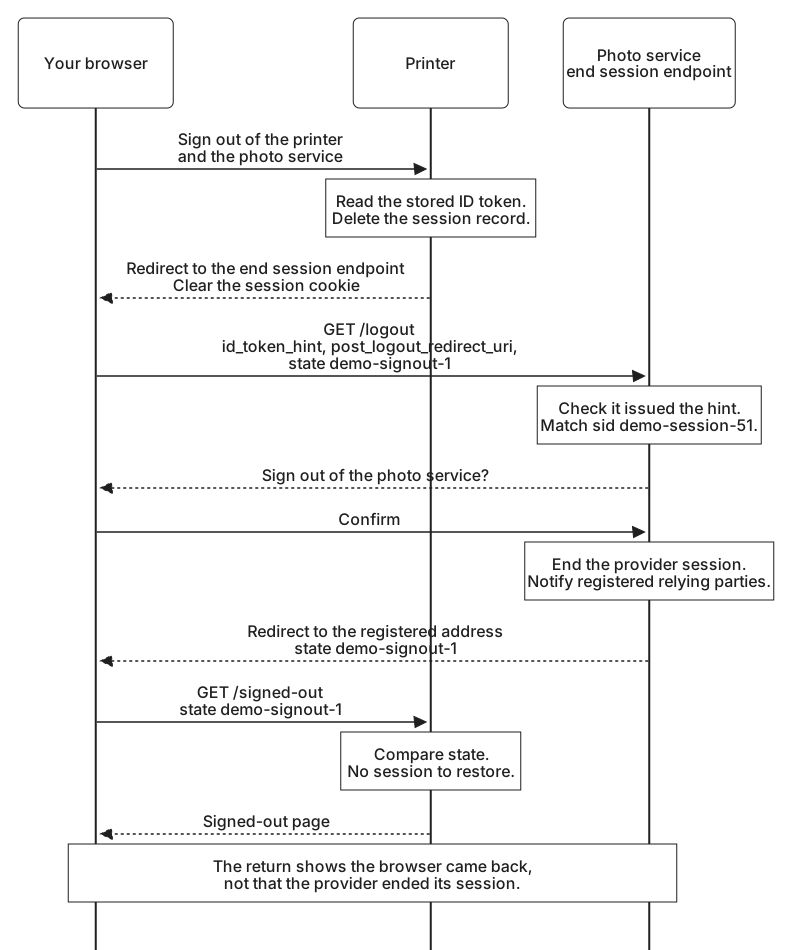
When you select the second button, the printer does three things in order. It reads the ID token it kept in your session record. It ends its own session, deleting the record and clearing the cookie, just as the ordinary Sign out does. Then it redirects your browser to the end session endpoint.
The specification leaves that order to the relying party. The printer could keep its session until the photo service tells it the sign-out happened, but that would depend on things the printer cannot count on. You might decide at the photo service to stay signed in, or close the tab, and the notification might not arrive. Ending the local session first means the one sign-out the printer controls has already happened, whatever follows.
The logout request
The printer's redirect sends your browser to this address, shown with its parameters on separate lines so we can read them:
https://auth.photos.example/logout
  ?id_token_hint=eyJhbGciOiJSUzI1NiIsImtpZCI6InBob3Rvcy1ycy0yMDI2LTA5IiwidHlwIjoiSldUIn0.eyJpc3MiOiJodHRwczovL2F1dGgucGhvdG9zLmV4YW1wbGUiLCJzdWIiOiJ1c2VyLTIwNDgi...
  &post_logout_redirect_uri=https%3A%2F%2Fprinter.example%2Fsigned-out
  &state=demo-signout-1
The ID token is shortened for display. The specification defines six parameters for this request, and the printer uses three of them:
| Parameter | What it does |
|---|---|
id_token_hint | An ID token the provider issued to this client, telling it which client, person, and session the request is about. Recommended. The printer sends the ID token from your 09:00 sign-in. |
post_logout_redirect_uri | Where to send the browser afterward. It must exactly match a registered address. |
state | A value returned unchanged with the browser, so the printer can recognize its own request. Here demo-signout-1. |
client_id | Names the client. Mostly used when there is no ID token hint. If both are sent, the provider checks that they agree. |
logout_hint | A hint about who is signing out, in a form the provider defines, such as an email address or a username. |
ui_locales | Preferred languages for any page the provider shows, such as en-US. |
The ID token in the hint expired at 09:05, and it is now 09:40. That does not matter, because the hint is not being used as proof of anything. The photo service checks that it issued the token, by verifying its own signature, and the specification asks it to accept an expired token when the client it names has a current or recent session. From aud, sub, and sid it learns that the printer is asking about your session, demo-session-51. If that sid did not match the session in this browser, because someone else had signed in since, the photo service would treat the request as suspect and could refuse to act on it.
A hint in a URL is recorded wherever URLs are recorded, such as browser history and server logs. The base ID token here carries only identifiers and times, but a provider that copies profile claims into its ID tokens would put those into the address as well. Providers must accept the logout request as a form POST as well as a GET, so a relying party that wants the hint out of the address bar can send it from a form that submits itself.
At the end session endpoint, the photo service shows a page asking whether you want to sign out of the photo service. The specification says a provider should normally ask, and must ask when the request has no valid ID token hint or names a session other than the one in this browser. Without that rule, any website could sign people out of the photo service with a link, which the specification treats as a form of denial of service.
You confirm, and the photo service ends its session. It then notifies the other relying parties signed in through that session, using whichever notification each one registered. That includes the printer, which registered for back-channel notices. Front-channel logout and Back-channel logout describe those notifications. Only then does it redirect the browser back. A request to sign out when the photo service has no session for you is not an error, so a second click, or a request after its session had already expired, simply succeeds.
Coming back
The photo service sends your browser to the address the printer named, adding the state value:
https://printer.example/signed-out?state=demo-signout-1It does so only because the address exactly matches one in the printer's registration. Any other value, even one differing by a trailing slash, is an error: the provider performs no redirect and shows its own page, where it may still offer to sign you out. Without that rule, a logout link could send people from the photo service to any page an attacker chose, perhaps one asking them to sign in again. For the same reason, a request with a post-logout address but no ID token hint gets no redirect unless the provider has some other way to confirm that the address is legitimate. Sending client_id in that case at least tells the provider which registration to check the address against.
Your session at the printer no longer exists, so the printer kept demo-signout-1 in a short-lived cookie of its own when it sent you away. When you return, it compares the value. If it matches, the printer deletes the cookie and shows a page that says you are signed out of the printer, and that signing out of the photo service was a choice the photo service asked you about. If the value is missing or different, the printer shows an ordinary signed-out page. Because the printer ended its session before the redirect, a forged return has nothing to restore or change.
Notice what the page does not say. The return shows that your browser came back, not that the photo service ended its session. You might have chosen to stay signed in there, and providers differ in whether they still send you back after you decline. If the printer ever needs to know that the photo service's session ended, that knowledge comes from a logout notification, not from this redirect.
Any other application you signed in to with your photo account at the library is signed out only if it registered for one of the photo service's logout notifications, and only if that notification reaches it. If the photo service did not offer an end session endpoint at all, the most the printer could do is say that you are still signed in there and link to the photo service's own sign-out page.