Pushing an authorization request
You select Connect again. This time the printer does not start by building a URL for your browser. Its backend first sends the authorization request to the photo service directly, and only then involves your browser.
The photo service accepts these requests at its pushed authorization request endpoint, often shortened to PAR endpoint, at https://auth.photos.example/par. The printer has the address from its configuration for the photo service, which also appears in the service's metadata under the name pushed_authorization_request_endpoint. Like every endpoint in these exchanges, it uses HTTPS.
Sending the request
All domains, credentials, and identifiers in these examples are fictional. The printer pushes the same request it used to put in the address bar:
POST /par HTTP/1.1
Host: auth.photos.example
Authorization: Basic cGhvdG8tcHJpbnRlcjpkZW1vLW9ubHktbm90LWEtcmVhbC1zZWNyZXQ=
Content-Type: application/x-www-form-urlencoded

response_type=code
&client_id=photo-printer
&redirect_uri=https%3A%2F%2Fprinter.example%2Foauth%2Fcallback
&scope=photos.read
&state=demo-attempt-7
&code_challenge=qd-75t-gnweZAhIl6REjxxgFnPXGwvqYcxq3vlsaJYQ
&code_challenge_method=S256
The body is form-encoded, as in a token request, and its line breaks are for display only. The parameters are exactly those of the authorization request: the response type, client ID, return address, scope, state, and PKCE challenge. Any extension parameter the printer could send to the authorization endpoint can be pushed in the same way.
The Authorization header is the printer's ordinary client authentication, the same client_secret_basic header it sends to the token endpoint. The rules for authenticating at the token endpoint apply here unchanged, including the method recorded in the printer's registration. A client registered for signed assertions, as described in Secrets and signed assertions, sends a client assertion instead, and its aud is the server's issuer identifier, just as at the token endpoint. PAR's specification originally told servers to accept their token endpoint or PAR endpoint address there as well. The tightened guidance described in that lesson replaces both with the issuer identifier alone.
Notice that client_id still appears in the body, although the header names the printer too. In the body it belongs to the authorization request, which always names its client. In the header it is part of a credential. Both name photo-printer, and a careful server refuses a push in which they disagree.
The body carries an authorization request and nothing else. The specification rules out one authorization parameter by name: request_uri, the reference this endpoint is about to hand out, because a push must not point to another stored request. Token request parameters such as grant_type or code have no meaning here either, since the body is not a token request. The only additions are client authentication parameters, which are used only to authenticate.
A public client can push as well. The printer's phone app would send a similar body under its own client ID, photo-printer-app, with no credential, because it has none to send. It still keeps its parameters out of the browser and gets a short URL, but the service cannot authenticate it at this point any more than it could at the token endpoint.
What the server checks
When the push arrives, the photo service works through it in order:
- Authenticate the client as it would at the token endpoint. If the printer's secret was replaced and one server still has the old one, the push fails here with
invalid_client, before you have seen a single page. - Refuse a push that contains
request_uri. - Validate the parameters as an authorization request. The return address must match one registered for this client, the scope must be one the printer may request, the response type must be allowed, and a PKCE challenge must be present if the service requires one.
This is where the late checks from The problem PAR solves move to the front. The service knows which client is asking and whether its request is acceptable before anyone is sent to a sign-in page. A request that fails is refused in a direct response to the printer, and you are never involved.
A service may postpone a check it cannot perform yet, but it must then perform that check when your browser arrives at the authorization endpoint. Nothing about signing in or consent is decided here either, because you have not been asked anything. Those decisions still happen in your browser, later.
The request URI it returns
When the checks pass, the service stores the request and answers:
HTTP/1.1 201 Created
Content-Type: application/json
Cache-Control: no-cache, no-store

{
  "request_uri": "urn:ietf:params:oauth:request_uri:demo-pushed-request-7",
  "expires_in": 90
}
The status is 201 Created because the service has created something: a stored authorization request. The request_uri refers to it. Despite the name, it is not an address the printer or anyone else can fetch. It is a URN, a uniform resource name: an identifier written in URI syntax that names something without saying where to retrieve it. The urn:ietf:params:oauth:request_uri: prefix is a standard form that servers may use, and the rest is up to the server. A real value must contain a part generated with a cryptographically strong random generator so that nobody can guess it. demo-pushed-request-7 is a readable stand-in.
expires_in gives the reference's lifetime in seconds. Ninety seconds is this example's choice. The specification leaves it to the server and expects it to be short, typically somewhere between a few seconds and ten minutes. The reference is also bound to the client that pushed it, so only photo-printer can use it.
The printer saves the request URI with the pending transaction, next to the PKCE verifier, and sends your browser on at once. The reference is not a secret in the way the verifier is, because your browser is about to carry it. It is simply good for one attempt and a short time.
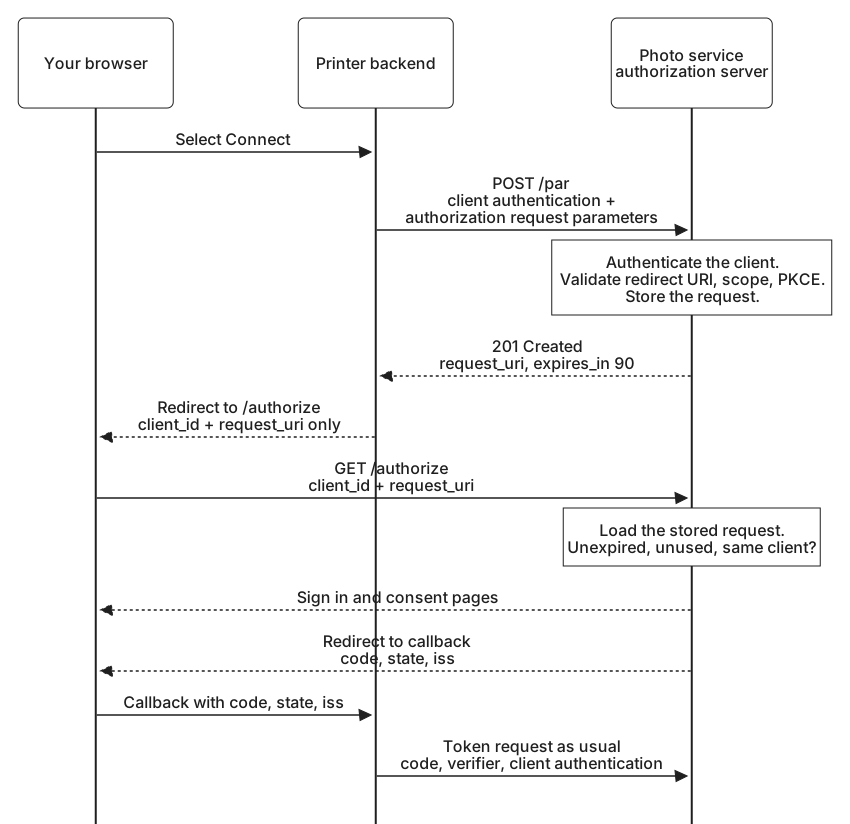
From here, the exchange looks almost like the one you already know. The difference is what your browser carries to the authorization endpoint: a client ID and this reference, and nothing else.