Attacks through apps and integrations
Access granted by the victim
At 09:31 on the morning of the Cedar Inc. incident, the attacker, signed in as Riley through a stolen session, approved a third-party app called Invoice Sync. The consent screen listed what the app wanted: to read Riley's mail and to send mail as Riley. One click later, Cedar's identity provider recorded the grant and issued the app its tokens. From then on, Invoice Sync could read Riley's mailbox through the mail service's API, the way any approved app can.
The attacker did not need Riley's session for that step. The same app could have been put in front of Riley directly. A message would link to Cedar's genuine sign-in page with a request from Invoice Sync, and Riley would sign in on the real site with whatever method Cedar requires, see the consent screen and approve. This is consent phishing: instead of stealing a credential, the attacker persuades someone to grant their app access.
Consent phishing gets past defenses built against stolen credentials. The sign-in page is genuine, so a passkey works normally, the real person completes MFA and nothing is relayed. The authorization server does what it was built to do: as Grants, scopes, and consent explains, it records the person's agreement and issues tokens for the approved scopes. Because the grant belongs to the app rather than to Riley's password or session, it keeps working after Riley's password is reset, until someone revokes it.
What it leaves in the records is the grant itself: which account approved which app for which scopes, when and from where, followed by the app's own requests to the mail API. An app with a single user in the organization, a publisher nobody can identify and permission to read and send mail is unusual on all three counts.
A code instead of a password
Device authorization lets a device without a keyboard, such as a television, get access by showing a short code that a person enters on another device. The person signs in and approves on the genuine site. The device, which has been asking the authorization server for the result at intervals, then receives tokens.
That lesson's section on a code someone else started describes the weakness: nothing ties the approval to a person standing in front of the device. In device code phishing, the attacker starts the request from their own device and sends the code to the victim with a pretext. Suppose a message reaches someone at Cedar: "Your mailbox needs activating on the new meeting room display. Go to login.cedar.example/device and enter the code below." The address is real. If they sign in and enter the code, the attacker's device receives tokens for their account.
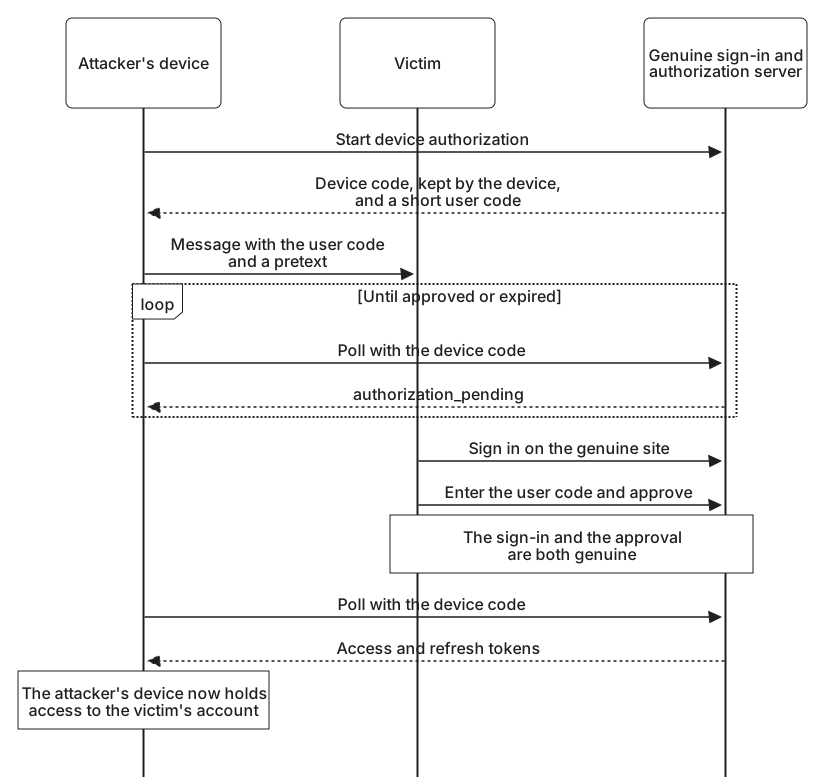
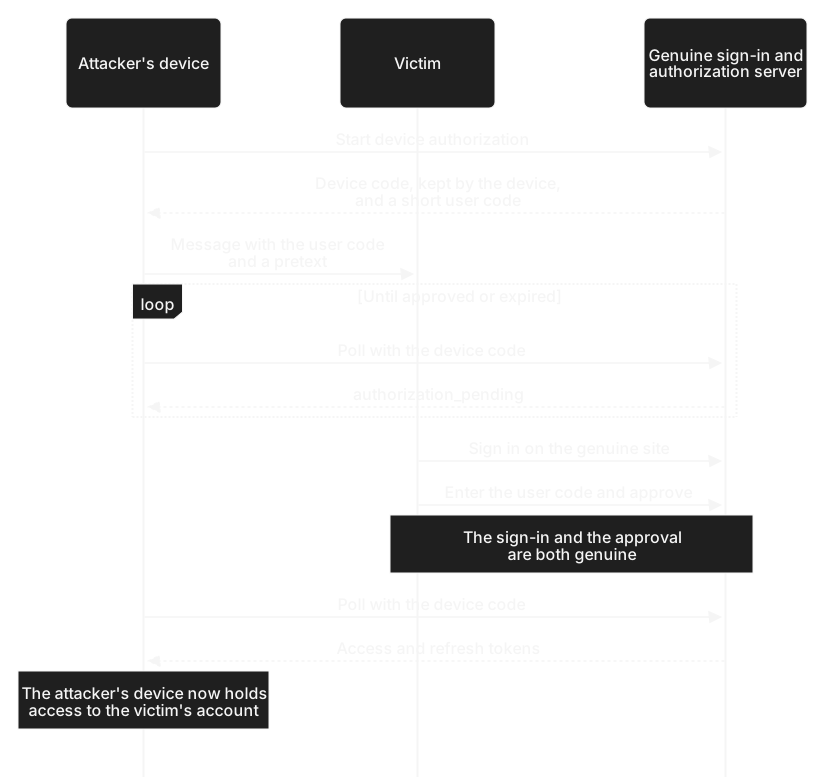
As with consent phishing, a phishing-resistant method does not help, because the sign-in really happens on the genuine site. The code expires within minutes, which only means the attacker sends it soon after starting the request. What helps is an approval screen that says plainly that the person is authorizing a device, names the app asking, and asks whether a device in front of them is showing this code. Where nobody needs device sign-in, an organization can turn it off, or allow it only for specific apps and managed devices such as meeting room displays.
In the records, a device code sign-in by someone who has never used one stands out, especially when the approval comes from one network and the resulting tokens are used from a hosting provider's network.
One integration, many customers
Some of the most valuable tokens are held by apps that are not malicious at all. Think of the printing application from Giving another application limited access. Thousands of photo application customers have connected it, and it keeps a refresh token for each of them so it can fetch photos when they order a book. Each grant is narrow, but the printing application holds all of them in one place.


Suppose an attacker breaks into the printing application and copies its token store. The refresh tokens alone are not enough: they were issued to the printing application, and the photo service accepts them only together with its client credentials, as Refresh token theft explains. But a breach that reaches the token store often reaches those credentials too, when both sit on the same servers. With both, the attacker can call the photo API as every customer who connected it, within the scopes each one granted, and any unexpired access tokens in the store work as well until they expire. No customer was phished and nobody signed in, and because the requests carry the application's own credentials, they look like ordinary integration traffic. The same holds for a workforce integration connected to the mail or files of hundreds of organizations: one breach reaches all of them.
Limiting this starts with narrow grants. An integration that needs to read one folder should not hold access to every file. The provider encrypts the stored tokens and keeps its client credential apart from them, ideally as a private key in a key management service that its application servers can use but not copy, so that a copied database does not carry it. Tokens bound to a key held the same way add another reason a copied token store is not enough on its own. The service that issued the tokens can watch each integration for changes in volume or in the kind of data it requests, and both sides need a quick way to revoke every grant held by one integration.
Software acting on someone's behalf
More software now acts for a person instead of simply storing data for them. Imagine an assistant that reads Riley's mail and drafts replies, or an automated agent that pays invoices once they are approved. Each holds delegated access, and each decides for itself what to do next based on what it reads.
That combination creates a different kind of risk: the software can be steered by the content it processes. An email sent to Riley might contain text written to look like an instruction, such as a request to forward last month's invoices to an outside address. The assistant has permission to read and send mail, so if it follows that text, it misuses Riley's access without any credential being stolen. When the software is driven by a language model, this is usually called prompt injection, but the pattern is older: a program holding someone's authority acts on input it should not trust.
The controls are those of any delegated access, applied more strictly. The software should hold only the scopes its task needs, so an assistant that drafts replies does not need permission to send them. Sensitive actions, such as sending mail outside the organization, paying or changing settings, should need the person's confirmation, shown somewhere the software cannot answer for them. Its access should end when the person's access ends.
The records should name both parties: the software that acted and the person it acted for. A record that says only that Riley sent a message hides whether Riley did it or an assistant did. A token the software obtains by exchanging the person's token can name both, as Delegation and impersonation shows with the actor claim.
Deciding which apps people can approve
Most organizations do not need every employee to be able to approve any app for any permission. A common arrangement lets people approve apps from verified publishers that ask only for low-risk permissions, such as reading their own profile, and sends every other request to an administrator for review. An app asking to read and send mail, read every file or administer accounts then waits for someone whose job is to ask whether it should have that access.
Publisher verification helps that review. The platform confirms which organization publishes an app, so the consent screen can show a verified name rather than whatever the developer typed. It tells you who is asking. It does not tell you that the app is safe, and a verified publisher can still ask for far more than it needs.
For each request, the person or the reviewer has a few questions to answer. Did I start this? Do the app's name and publisher match what I expected? Are the permissions what the task needs? How did I arrive at this screen? A consent request that arrives through an unexpected email, or a device code that arrives in a message, fails the first question. Try those questions on the following screens.
Approve or decline?
Simulation. These screens and the situations around them are made up. Choosing an answer sends nothing and approves nothing.
Reviewing what has been granted
Approvals accumulate. People connect apps for a project and forget them, apps change owners, and permissions granted years ago remain. A review lists every grant with its app, publisher, scopes, the people who approved it and when it was last used. Apps nobody has used for months, apps with broad scopes and a single user, and apps from unverified publishers are the first to question.
Invoice Sync would have stood out in that list: one user, permission to read and send mail, and approved through the same session that had just added a new authenticator. Containing the Cedar incident meant revoking it.
Revoking has to reach every part of the grant: the recorded consent, the refresh tokens issued under it and, for an app that should not be used at all, its permission to ask anyone in the organization for access. Access tokens already issued may keep working until they expire, as Revoking access and sharing security events explains.
Between reviews, the apps' own activity is the signal: a mail app that suddenly reads thousands of messages, a new app sending mail outside the organization, or an integration calling from a network it has never used. Those patterns are where Detecting identity attacks picks up.