Starting sign-in from another service
All domains, identifiers, and values in these examples are fictional.
Lantern Studio's designers start each morning in the same place: the app dashboard that Lantern's identity provider shows once they have signed in. It has a tile for each application Lantern uses, including the project portal and the timesheets app. A designer selects Project portal and expects to land in the portal, already signed in, without meeting another sign-in page.
Every sign-in so far has started at the relying party. You selected Continue at the printer, and the printer wrote the authentication request. Here the first click happens somewhere else. The dashboard knows which application the designer wants and which provider they use, but the sign-in still has to finish at the portal, with an ID token the portal has reason to trust.
A tile on the dashboard
The simplest tile would be a plain link to https://portal.lantern.example. The portal would see a visitor with no session, send them to Lantern's identity provider, and receive them back a moment later with a code, because the identity provider still remembers the designer from this morning. For a portal with one provider and one front page, that is nearly enough.
It stops being enough as soon as the dashboard has more to say. A portal that accepts several providers would not know which one to use and would have to ask. The designer may hold more than one account, and the dashboard knows which one they are using right now. And the click may not be meant for the front page at all. Lantern's dashboard also shows recent activity, such as a new comment on the autumn catalogue project, and a designer who selects that item wants to land on the project, not on the portal's home page.
OpenID Connect gives this click a standard form, called third-party initiated login. "Third party" here means any party other than the relying party. Most often it is the provider's own dashboard, as at Lantern, but it could be an intranet page or a partner's site that lists the applications its users can open. The initiator does not sign anyone in. It sends the browser to the relying party with a request: please start a sign-in, at this provider.
The login initiation endpoint
The portal accepts these requests at its login initiation endpoint, an address it chooses for the purpose. Registering a relying party mentioned the registration field that records it, initiate_login_uri. Lantern's administrator entered the portal's value when adding the portal to the dashboard:
Client ID: lantern-portal
Redirect URIs:
  https://portal.lantern.example/signin/callback
Login initiation endpoint (initiate_login_uri):
  https://portal.lantern.example/signin/start
The address must use HTTPS. It does not have to be the portal's home page, and usually is not, because it does a different job: it starts a sign-in rather than showing anything. When the designer selects the comment about the autumn catalogue, the dashboard sends their browser there:
https://portal.lantern.example/signin/start
  ?iss=https%3A%2F%2Fidp.lantern.example
  &login_hint=designer-42
  &target_link_uri=https%3A%2F%2Fportal.lantern.example%2Fprojects%2Fautumn-catalogue
The request has three parameters, and only the first is required:
| Parameter | What it asks the portal to do |
|---|---|
iss | Required. Send its authentication request to the provider with this issuer identifier, which must be an HTTPS URL. |
login_hint | Optional. Suggest this account to the provider. Here the dashboard uses the designer's subject identifier at Lantern's identity provider, one of the values the specification mentions. An email address or username is also common. |
target_link_uri | Optional. Show this page once the designer is signed in. |
The parameters can arrive in the query string of a GET request, as here, or as fields of a form that the dashboard's page submits automatically with POST. A relying party that registers a login initiation endpoint must accept both. It must understand iss and login_hint, should support target_link_uri, and ignores any parameter it does not understand.
Each value is phrased as a request, and the portal decides whether to honor it. A tile on a trusted dashboard and a link in a stranger's email arrive at this endpoint looking exactly alike. Processing a login initiation request works through the decisions the portal makes about each parameter.
A request, not a result
The design is easiest to appreciate next to the alternative. Lantern's identity provider already knows the designer is signed in. It could skip the request altogether and send the portal a signed statement through the browser: this is designer-42, who signed in at 08:40. Some older single sign-on deployments work exactly that way. SAML, which the JWT and SAML assertion grants lesson met as an assertion format, also has a sign-in protocol, and in it this pattern is called identity provider initiated sign-on: the provider posts the application an assertion that no request asked for.
The trouble lies in "no request asked for." When the printer received an ID token, it checked the state in the callback and the nonce in the token against a pending sign-in started in that same browser. An unrequested assertion has nothing to match. The application cannot tell whether this browser asked to be signed in at all, or whose idea the assertion was.
That gap is enough for an attack. Someone signs in at the provider with their own account, captures the assertion meant for the application, and gets your browser to deliver it, perhaps through a page that submits it automatically. The application signs you in to the attacker's account, and whatever you upload or type there lands where the attacker can read it. It is the sign-in version of the forged callback in Request correlation and CSRF. A captured assertion can also be replayed until it expires, unless the application remembers every assertion it has accepted.
Third-party initiated login avoids both problems by never sending a result that was not asked for. The dashboard only asks the portal to begin. The portal then creates a pending sign-in for this browser, with fresh state, nonce, and PKCE values, and sends the designer to Lantern's identity provider with an ordinary authentication request. Everything that comes back answers a request the portal made, in this browser, and is checked exactly as the printer checks its own sign-ins.
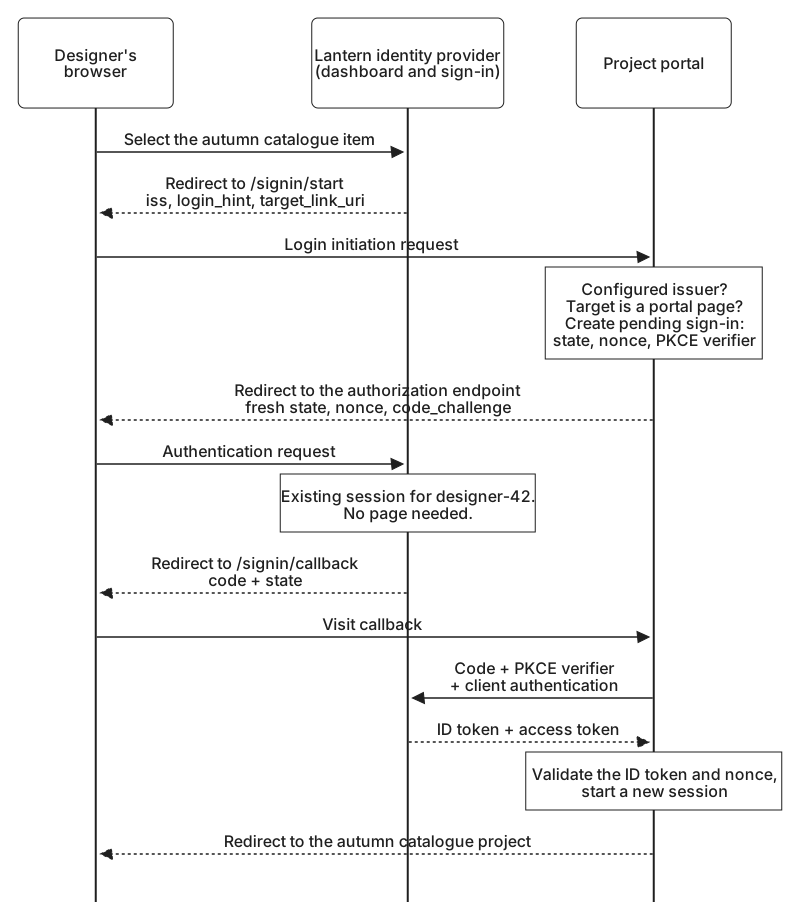
For the designer, the extra hops are invisible. Lantern's identity provider still holds their session from this morning, so it answers the portal's request at once, without a sign-in page, and the browser arrives at the autumn catalogue project a moment after the click. If that session has expired, the designer signs in again with the right account already suggested, because the portal passed the login_hint along.
Some dashboards offer a shortcut for applications that have no login initiation endpoint: they send a code or an ID token straight to the application's redirect URI, as if the application had asked. A careful relying party rejects such a callback, because it matches no pending sign-in in the browser that delivered it. Registering a login initiation endpoint gives the dashboard a way to start sign-in that the portal can accept without lowering that rule.