Following a CIBA exchange
All domains, identifiers, keys, and tokens in these examples are fictional. Readable values make the example easy to follow. Real ones are long and random.
You have typed your email address into the kiosk and pressed Continue. Behind the screen, the kiosk's servers now have three jobs: ask the photo service to find you, wait while you decide on your phone, and collect the result. Every message travels directly between the kiosk's servers and the photo service. Your phone talks only to the photo service.
Asking the provider to reach you
The photo service's discovery document lists a backchannel_authentication_endpoint, at https://auth.photos.example/bc-authorize. The kiosk sends its request there:
POST /bc-authorize HTTP/1.1
Host: auth.photos.example
Content-Type: application/x-www-form-urlencoded

scope=openid%20photos.read
&login_hint=robin%40mail.example
&binding_message=H4PX
&client_assertion_type=urn%3Aietf%3Aparams%3Aoauth%3Aclient-assertion-type%3Ajwt-bearer
&client_assertion=eyJhbGciOiJFUzI1NiIsImtpZCI6Imtpb3NrLTIwMjYtMTAiLCJ0eXAiOiJKV1QifQ...
The assertion is shortened here for display, and the line breaks in the body are for display only. The request answers three questions: which client is asking, what it wants, and whom the photo service should reach.
The client is identified by its client authentication, which CIBA requires at this endpoint as well as at the token endpoint, using the method in the client's registration. The kiosk uses private_key_jwt, as described in Secrets and signed assertions: a short-lived assertion with iss and sub set to printer-kiosk and aud set to the photo service's issuer identifier, signed with a key only the printing company holds. The specification recommends public-key methods like this one over sending a shared secret with these requests. Authentication matters more here than in a browser-based authorization request, because this request makes something happen on your phone, and the photo service needs to know which client is responsible for it.
What it wants is in scope, which must include openid, because CIBA is an OpenID Connect flow. The kiosk also asks for photos.read, so that it can fetch the photos you choose to print. It could add acr_values to ask for a particular kind of authentication, as Authentication context and methods described.
Whom to reach is new. The redirect-based sign-in never needed to say, because you identified yourself to the photo service in your own browser. Here the photo service has no conversation with you until it reaches your phone, so the client must name you. It sends exactly one of three hints:
| Hint | What it carries |
|---|---|
login_hint | A value that identifies you to the provider, such as an email address, phone number, username, or subject identifier. The kiosk asked you for yours. |
id_token_hint | An ID token that the provider issued to this same client earlier, identifying you by its subject. |
login_hint_token | A token that identifies you, in a format the deployment defines. |
The last parameter, binding_message, is a short code that the kiosk shows on its screen and the photo service shows on your phone, so that you can tell the two belong together. Binding the authentication to the request explains the binding message, and why the choice of hint matters so much.
The acknowledgement
The photo service authenticates the kiosk, checks the parameters, and resolves the hint to your account, user-2048. It does not wait for you. It answers at once:
HTTP/1.1 200 OK
Content-Type: application/json
Cache-Control: no-store

{
  "auth_req_id": "demo-auth-req-21",
  "expires_in": 120,
  "interval": 5
}
auth_req_id identifies this authentication request. It plays the part the device code played for the photo frame: the kiosk keeps it on its servers with the record of your visit, treats it as opaque, and never shows it on screen. A real one carries at least 128 bits of randomness, so that nobody can guess an identifier belonging to another request. expires_in gives you two minutes to respond. interval is the minimum number of seconds between the kiosk's requests for the result. Without it, the kiosk would wait five.
The kiosk could have asked for a different lifetime with requested_expiry, perhaps a longer one for customers who need time to find their phones. The photo service may take that into account, but the expires_in it returns is the one that counts.
If something is wrong, the answer comes back here, before your phone is involved. These are the errors a kiosk is most likely to meet:
| Error | Meaning |
|---|---|
invalid_request | A required parameter is missing or malformed, or the request carried more than one hint. |
unknown_user_id | The photo service could not tell which person the hint identifies. |
unauthorized_client | This client is not allowed to use CIBA. |
invalid_client | Client authentication failed. Sent with status 401. |
access_denied | The photo service refused the request outright, before involving anyone. Sent with status 403. |
The first three use status 400, as do a few more that relate to binding messages, user codes, and hint tokens. Those appear with their subjects in Binding the authentication to the request.
With the acknowledgement in hand, the kiosk's screen reads: Check your phone. Approve the request showing H4PX.
Approving on your phone
Meanwhile, the photo service reaches your phone. Its app shows the request: the client's registered name, Print kiosk, the access it wants, and the binding message, H4PX. If the photo service wants you to authenticate first, at whatever strength its own policy or the kiosk's acr_values calls for, the app asks for that before showing the decision. You compare the code with the kiosk's screen and approve.
The kiosk did very little here. It never showed a sign-in page and never handled anything that could authenticate you. It passed on a hint. The decision was made between you and the photo service, on a device the photo service already trusted to be yours.
If you decline, or put your phone away and let the two minutes run out, the request ends there. The kiosk learns the outcome the next time it asks.
Collecting the tokens
While you were approving, the kiosk was asking the token endpoint for the result, no more often than every five seconds. Each request authenticates the client again, with a fresh client assertion:
POST /token HTTP/1.1
Host: auth.photos.example
Content-Type: application/x-www-form-urlencoded

grant_type=urn%3Aopenid%3Aparams%3Agrant-type%3Aciba
&auth_req_id=demo-auth-req-21
&client_assertion_type=urn%3Aietf%3Aparams%3Aoauth%3Aclient-assertion-type%3Ajwt-bearer
&client_assertion=eyJhbGciOiJFUzI1NiIsImtpZCI6Imtpb3NrLTIwMjYtMTAiLCJ0eXAiOiJKV1QifQ...
The grant type is another full URN, urn:openid:params:grant-type:ciba, this time from the OpenID Foundation rather than the IETF. The photo service checks that demo-auth-req-21 was issued to printer-kiosk. An identifier that was issued to another client, or that it does not recognize, gets invalid_grant.
Until you decide, the answers are the ones the photo frame received: authorization_pending, or slow_down if the kiosk asks too often. access_denied means you declined, and expired_token means the two minutes ran out. Either one ends the attempt, and the kiosk offers to start again. Once you approve, the next request returns an ordinary token response:
HTTP/1.1 200 OK
Content-Type: application/json
Cache-Control: no-store

{
  "access_token": "demo-access-token-30",
  "token_type": "Bearer",
  "expires_in": 600,
  "id_token": "eyJhbGciOiJSUzI1NiIsImtpZCI6InBob3Rvcy1ycy0yMDI2LTA5IiwidHlwIjoiSldUIn0..."
}
The ID token is shortened here for display. Its decoded claims read:
{
  "iss": "https://auth.photos.example",
  "sub": "user-2048",
  "aud": "printer-kiosk",
  "iat": 1791036100,
  "exp": 1791036400,
  "auth_time": 1791036095
}
The kiosk validates it as Validating an ID token described, with its own client ID as the audience. One familiar check has nothing to compare: the backchannel request had no nonce parameter, so the token carries none. The way the token arrived does that job instead. Only the kiosk could redeem demo-auth-req-21, after authenticating, directly at the token endpoint, and the identifier stopped working once it was redeemed.
The token's iss and sub now identify you, exactly as they would after a redirect sign-in. The kiosk uses them, not the email address someone typed on its screen, to decide whose albums to show. Had the kiosk sent an id_token_hint, it could also confirm that the new token names the same subject as the hint.
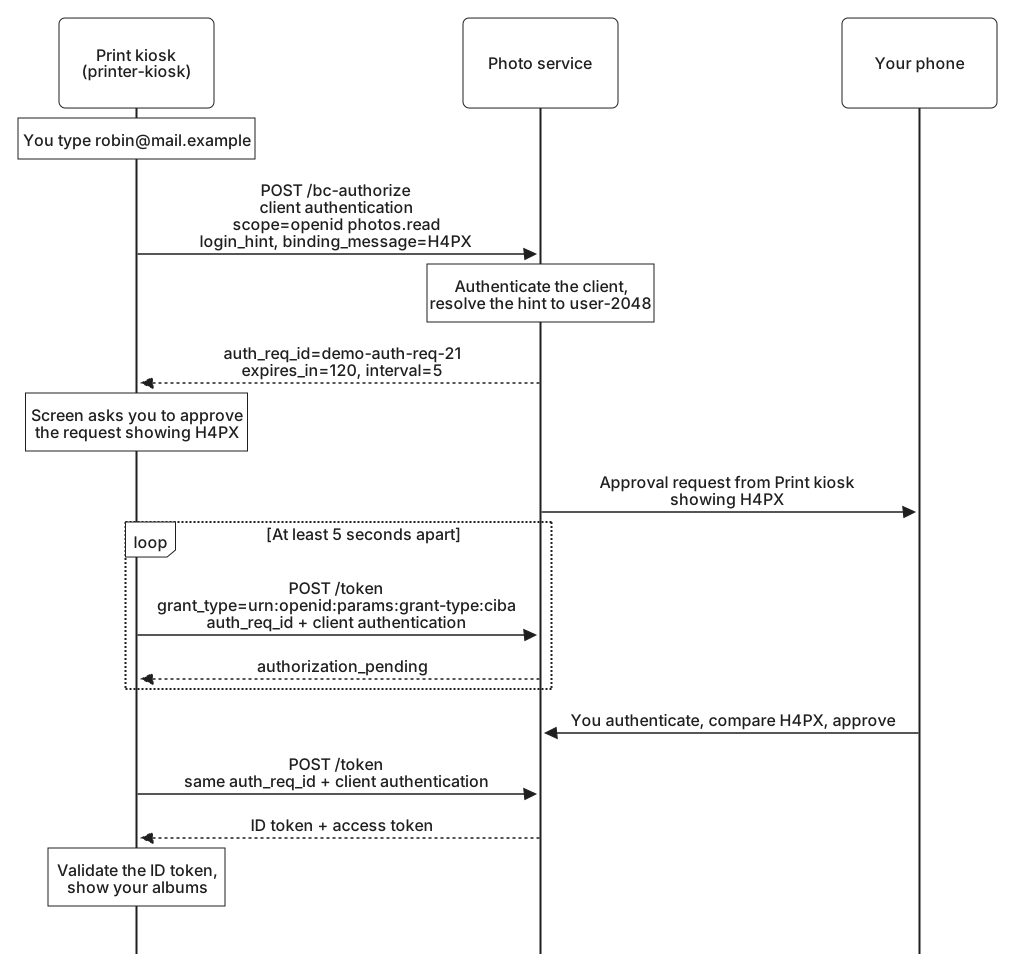
The access token goes to the photo API like any other, and your albums appear on the kiosk's screen. Polling is only one of the three ways CIBA can deliver this result. Poll, ping, and push modes compares it with the other two.