Requesting and approving access
Asking for something specific
A week after moving to oncology, Sam Reyes joins the team reviewing results from one of Harbor Clinic's chemotherapy studies. The work means reading the oncology research database, which holds treatment and outcome data for patients enrolled in studies. No rule grants it. Only a few oncology nurses work on studies at any time, and HR does not record which ones.
So Sam has to ask. Years ago, that meant an email to the help desk: "Can I have access to the research system, like the others on the study?" Jordan Ellis, the IT administrator who picked it up, then had to work out which system Sam meant, whether Sam needed to read data or change it, and who should agree. Each of those guesses could be wrong, and nothing recorded how the answer was reached.
An access catalog replaces the guessing. It lists the entitlements people can request, each described in words that a requester and an approver can both understand. The descriptions come from the entitlement owners, the same plain descriptions that Identities, accounts, and entitlements argued every entitlement needs. Sam searches the catalog for "research" and finds this entry:
| Field | Entry |
|---|---|
| Name | Oncology research database, read only |
| Technical name | ONC_RESEARCH_R in the patient records system |
| What it allows | Read treatment and outcome data for patients enrolled in oncology studies. No changes and no exports. |
| Intended for | Staff working on an approved oncology study |
| Owner | Morgan Hale, records manager |
| Sensitivity | High: identifiable patient data |
| Approvals | The requester's manager, then the owner |
| Longest duration | 180 days |
All names, identifiers, and records in these examples are fictional.
The entry tells Sam what will happen before anything is submitted: who will be asked, and that the access will end. Birthright access does not appear in the catalog, because nobody needs to ask for it. Administrator rights can appear, with a stricter path of their own.
A reason and an end
The request form asks Sam two questions the email never did: why, and for how long.
Sam writes: "Member of the chemotherapy outcomes study team for its data review. I need to read enrolled patients' treatment and outcome records." A reason like "needed for work" would be true of almost any request and tells nobody anything. A specific reason lets the approvers judge the request now, and it lets a reviewer months later decide whether the reason still holds.
For the duration, Sam asks for 90 days, the length of the data review. The catalog sets a default and a longest allowed period, and the request stores its end date from the start. When the review finishes, the access ends with it, without anyone having to notice. If the work runs longer, Sam submits a renewal with a fresh reason, and the approvers decide again with what they know then.
Requests are not always made by the person who will use the access. A manager can request access for a new team member, and the record keeps both names: who asked, and who will hold the access.
Who approves
Two different people decide Sam's request, because it raises two different questions.
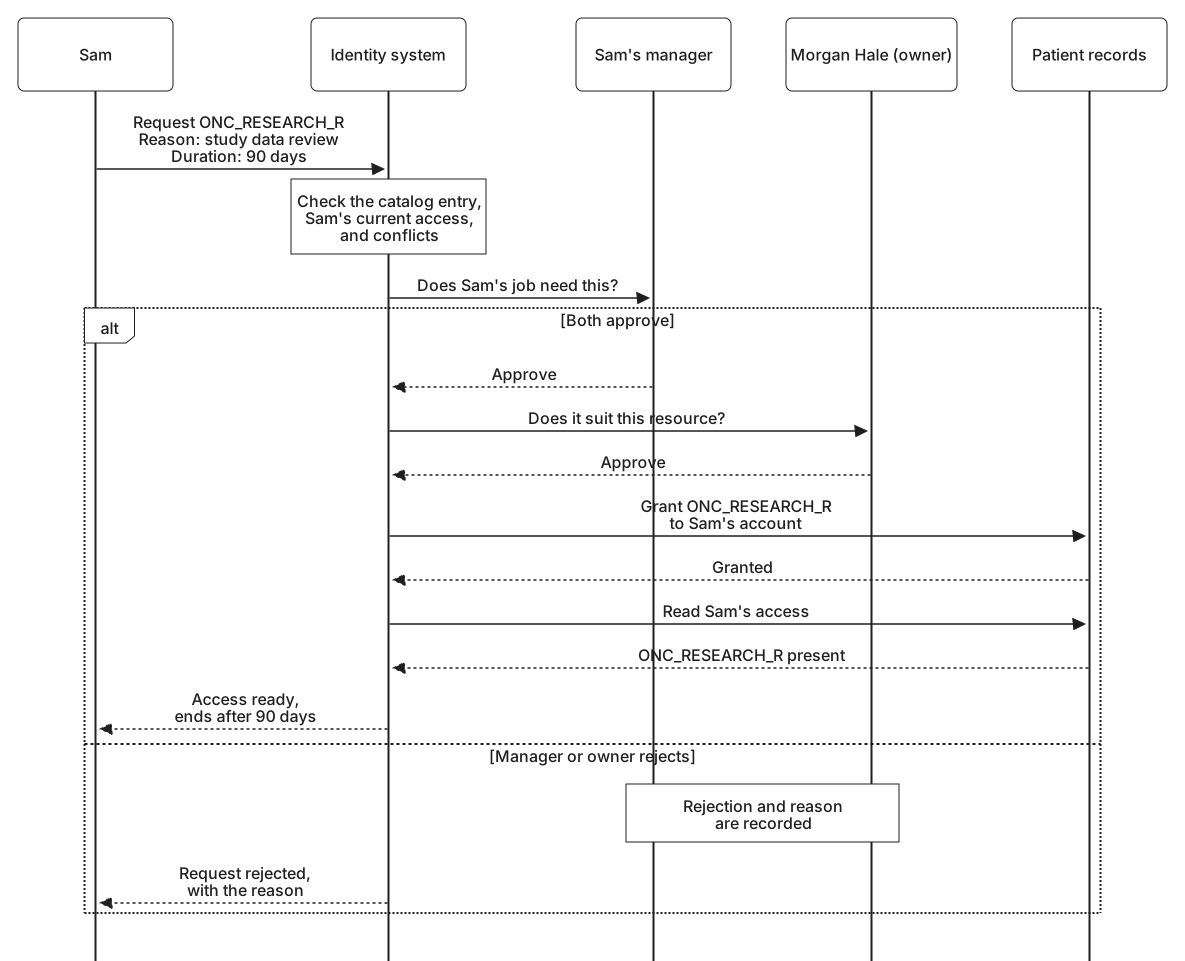
Sam's manager, the oncology nurse manager, answers whether Sam's job needs this access. The manager knows that Sam is on the study team and what the work involves. Morgan Hale, as the owner, answers whether the access is right for this resource: whether the study is approved, whether Sam has completed the training that research access requires, and whether read access is the right level. The manager cannot judge the database, and Morgan cannot judge Sam's daily work, so each approval covers what the other cannot.
How many approvals a request needs follows its risk. Adding someone to a team's shared folder might need nobody beyond the catalog's own checks. ONC_RESEARCH_R needs the manager and the owner. Administrator rights in patient records might add the security lead as a third approver. The order matters too. The manager goes first, so the owner does not spend time on requests the job does not need.
One rule holds whatever the risk: nobody approves their own request. That is easy to enforce when the requester and the approver are plainly the same person. It is easier to miss when authority has been passed around. If Morgan requested administrator rights in patient records, the owner's approval could not come from Morgan, so the request would go to a deputy owner instead.
Delegation is where this usually goes wrong. Suppose that in February, with the data review running late, Sam's manager takes two weeks of holiday and delegates approvals to Sam, by then settled on the unit, and Sam's renewal of the research access arrives during that time. The identity system compares the approver with the requester every time it routes a request, not only when the delegation is set up, so it sees that they are the same person. It skips Sam and sends the request to the manager's own manager, the head of nursing. Delegation passes on the work of approving. It never passes on the ability to approve for yourself.
Fulfilment
Once both approvals are in, the request has to become real access. This step is fulfilment. Patient records accepts changes from the identity system's provisioning service, so fulfilment there is automatic: Sam's account is added to ONC_RESEARCH_R within a minute of Morgan's approval. Some of Harbor's applications have no such connection. For them, fulfilment is manual. The identity system opens a ticket, and someone such as Jordan makes the change by hand.
Either way, a request is not complete when someone says it is. It is complete when the access exists in the target system and the identity system has checked. After granting the entitlement, the identity system reads Sam's access back from patient records and marks the request fulfilled only when ONC_RESEARCH_R is there. For a manual change, the check comes from reading the application or from its next reconciliation, which Keeping systems in sync described.
Here is Sam's request as the identity system records it:
Request        REQ-26-04417
Status         Fulfilled and confirmed
Requested by   Sam Reyes (E07731), Oncology
Requested for  Sam Reyes (E07731)
Entitlement    ONC_RESEARCH_R, patient records
               "Read treatment and outcome data for patients
               enrolled in oncology studies. No changes and no
               exports."
Reason         "Member of the chemotherapy outcomes study team for
               its data review. I need to read enrolled patients'
               treatment and outcome records."
Duration       90 days, ends 2027-02-15
Approvals      Manager, then owner (catalog: high sensitivity)

Decision trail
2026-11-16 09:12  Submitted by Sam Reyes
2026-11-16 09:12  Checked: no conflict with Sam's current access
2026-11-16 14:30  Approved by the oncology nurse manager:
                  "Sam is on the study team for the review."
2026-11-17 10:05  Approved by Morgan Hale, owner:
                  "Study approved. Research access training
                  completed 2026-11-10."
2026-11-17 10:06  Granted by the provisioning service
2026-11-17 10:07  Confirmed: patient records lists ONC_RESEARCH_R
                  for Sam's account
2026-11-17 10:07  Removal scheduled for 2027-02-15
Each line answers a question someone will ask later. The description is the one the approvers saw, so nobody has to guess what they thought they were approving. The reason is in Sam's words, and the notes are in the approvers' words. The conflict check runs before any approver sees the request, for reasons Separation of duties explains. The confirmation comes from patient records itself rather than from a closed ticket, and the removal date was set at the moment of the grant.
The confirmation step exists because of requests like one Harbor found in the billing system. A clerk's request for billing access was approved, and the ticket for the manual change was closed by mistake during a queue cleanup before anyone made it. The request showed as complete. The clerk waited, and colleagues covered the work, until someone asked why it had taken a week. Checking the billing system would have shown the next day that the approved access did not exist, and reopened the work.
When approval stops meaning anything
Approvals are only as good as the attention behind them. Sam's manager approves requests for a unit of forty nurses: shared folders, printers, distribution lists, training systems, and now and then something like the research database. In a busy week that is seventy requests. After a month of them, it is natural to approve from a phone between patients, in seconds, without reading.
This is approval fatigue: so many requests that approving becomes a reflex. The approvals still appear in the record, and the record now overstates what was checked. A careless approval of the research database looks, in the record, exactly like a careful one.
Missing context makes it worse. A request that reads only "ONC_RESEARCH_R, 90 days" asks the manager to approve a name. An approver can judge a request when it shows what the access allows in plain words, how sensitive it is, the requester's reason, what the requester already holds, and whether others in the same job have it. If an approver cannot tell what a request means, the honest answer is to ask or to reject, not to approve and hope.
The most effective fix is fewer requests. Harbor approves low-risk catalog items automatically, such as a unit's shared folder or a printer, once their owners have classified them as low risk. Those grants are still recorded, still reviewed later, and still removed when the person moves. Automatic approval never applies to sensitive data, to access that conflicts with what the person already holds, or to anything that grants management authority. Sam's manager now sees a handful of requests a week, and each one gets a careful read.
Some signs show that approval has stopped meaning anything: decisions made within seconds of arriving, approvers who have never rejected a request, and approvals for people who had already left. Measuring approvers by how quickly they respond rewards exactly those habits.
Sam's research access ends after 90 days because the need is temporary. Harbor also wants administrator rights to be temporary, even when the need for them comes back every month. Continue to Temporary, privileged, and emergency access to see how.