Back-channel logout
All domains, identifiers, and tokens in these examples are fictional.
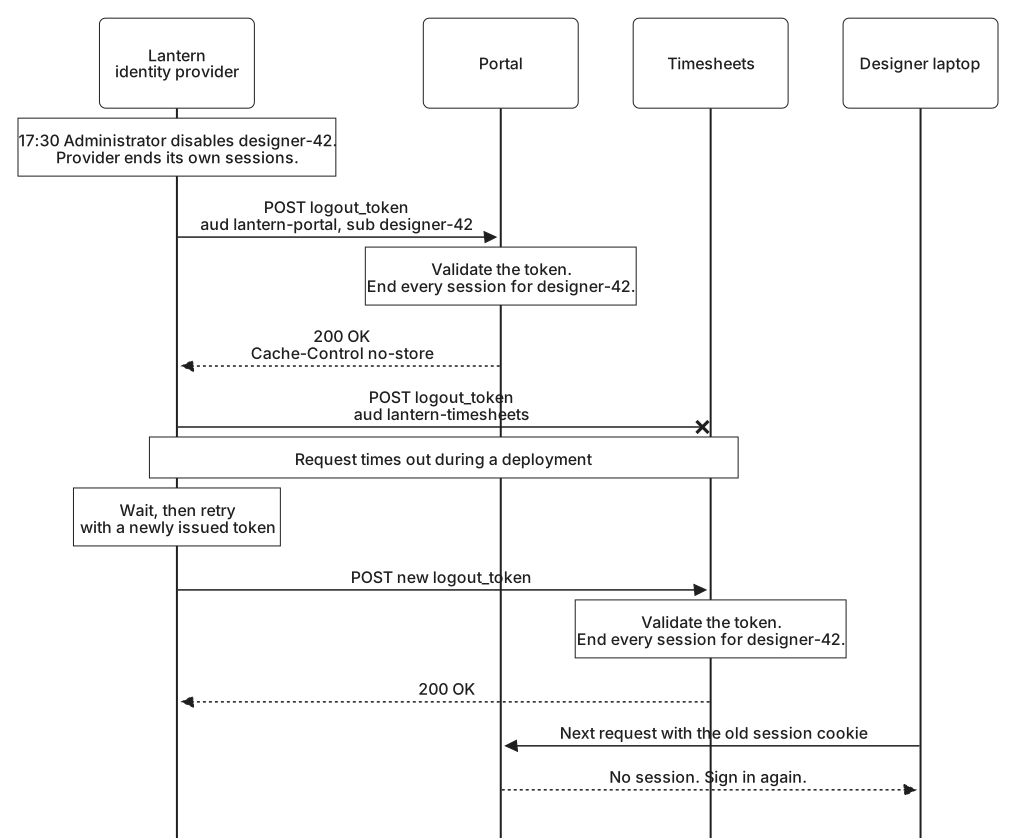
Suppose designer-42 is leaving Lantern Studio, and Friday 2 October 2026 is their last day. At 17:30 UTC, Lantern's administrator disables the account at Lantern's identity provider. From that moment the provider refuses any new sign-in for designer-42, and it ends the sessions it holds for them.
That still leaves the applications. The designer is signed in to the portal on a laptop and to timesheets on a phone, and each application's session would run until its own timeout. Front-channel logout cannot help here. It needs the designer's browser to load the provider's sign-out page, and the designer is not at that page and may not be at a computer at all.
A direct message
Back-channel logout takes the browser out of the path. The provider sends each application a request directly, from its server to theirs, at an address the application registered:
{
  "client_id": "lantern-portal",
  "backchannel_logout_uri": "https://portal.lantern.example/logout/back-channel",
  "backchannel_logout_session_required": false
}
The portal does not require a session ID in these messages, so Lantern's provider can send one message that covers every session a designer has. When the administrator acts, the provider looks up the applications signed in through any of designer-42's sessions. It keeps that list on its own servers. Some providers track signed-in applications in a cookie in the person's browser, which serves a sign-out the person starts but not one an administrator starts. Then the provider sends each application a POST:
POST /logout/back-channel HTTP/1.1
Host: portal.lantern.example
Content-Type: application/x-www-form-urlencoded

logout_token=eyJhbGciOiJSUzI1NiIsImtpZCI6ImxhbnRlcm4tMjAyNiIsInR5cCI6ImxvZ291dCtqd3QifQ.eyJpc3MiOiJodHRwczovL2lkcC5sYW50ZXJuLmV4YW1wbGUiLCJhdWQiOiJsYW50ZXJuLXBvcnRhbCI...
The token is shortened for display. There is no cookie in this request and no browser behind it, so third-party cookie rules and closed tabs cannot get in the way. The cost falls on the application. Its logout address must be reachable from the provider, which an application on a private network may not be. And it must be able to find and end a session without the browser that holds it, a requirement that returns below.
The logout token
The logout_token parameter carries a logout token, a signed JWT built much like an ID token. Decoded, the portal's token reads:
Header:
{
  "alg": "RS256",
  "kid": "lantern-2026",
  "typ": "logout+jwt"
}

Claims:
{
  "iss": "https://idp.lantern.example",
  "aud": "lantern-portal",
  "iat": 1790962200,
  "exp": 1790962320,
  "jti": "demo-logout-1",
  "sub": "designer-42",
  "events": {
    "http://schemas.openid.net/event/backchannel-logout": {}
  }
}
Several claims are familiar. iss is Lantern's issuer, and aud is the client the message is for; timesheets receives its own token, with aud set to lantern-timesheets. iat and exp are 17:30:00 and 17:32:00 UTC. The specification encourages providers to make logout tokens expire within about two minutes, so a captured token is of little use later. jti gives this token a unique identifier.
events is what makes it a logout token. Its value is a JSON object containing a member named http://schemas.openid.net/event/backchannel-logout, whose own value is an object, normally an empty one. The name looks like a web address, but it is only an identifier, and nothing fetches it.
sub and sid say which sessions to end, and a logout token must contain at least one of them. With sid, it means the sessions tied to that one session at the provider. With only sub, as here, it means every session the application holds for designer-42 from this issuer, on the laptop and the phone alike. When a designer simply signs out of one browser at the end of an ordinary day, Lantern's provider sends tokens that carry that browser session's sid as well, and only those sessions end.
Two rules keep a logout token from being mistaken for an ID token. It must never contain nonce. A relying party that sent a nonce in its sign-in request rejects any ID token without the matching value, so a logout token slipped into a sign-in response fails at once. And Lantern's provider sets typ to logout+jwt, an explicit type, just as the JWT access tokens in Token formats and validation carry at+jwt. The specification recommends the type but stops short of requiring it, because many existing providers send logout tokens without one. An application can require it once it knows its provider sets it, as the portal knows of Lantern's.
Logout tokens are signed with the same keys as the provider's ID tokens, here Lantern's key lantern-2026, and never with the algorithm none. The signature is what makes the message safe to act on. The logout address is reachable by anyone who can reach the application, and without a signature anyone could post to it and sign Lantern's designers out.
Validating and acting
The portal validates the token before acting on any of it, reusing most of its ID token validation:
- Verify the signature with a key from Lantern's published key set, selected by
kid, using an algorithm the portal accepts for Lantern's ID tokens. - Check that
typislogout+jwt, since Lantern's provider always sets it. - Check
iss,aud,iat, andexpas for an ID token: exactly Lantern's issuer, an audience that containslantern-portal, and times within a small tolerance. - Check that
sub,sid, or both are present. - Check that
eventscontains the back-channel logout member. - Check that there is no
nonce. - Check that this
jtihas not been seen recently. The specification makes this check optional, and the portal makes it. It remembers each value until its token expires, which with two-minute tokens is a short list.
Any failure means the portal rejects the request with 400 Bad Request and ends nothing. If the portal had registered to receive encrypted ID tokens, it would decrypt the logout token first, and reject one that arrived unencrypted.
With a valid token, the portal finds the sessions it names. Its session store keeps the issuer, subject, and sid from each session's ID token, so the lookup is a query: every session whose issuer is https://idp.lantern.example and whose subject is designer-42. The portal deletes them, along with anything it kept for them, such as the short-lived photo service access tokens it obtained for the designer through the assertion grant from JWT and SAML assertion grants. For refresh tokens Lantern issued, the specification's rule is that those issued without offline_access to a session being logged out should be revoked, and those issued with it normally should not. A departing designer is a different case from an ordinary sign-out, and Lantern's provider revokes their remaining grants itself.
Then the portal answers:
HTTP/1.1 200 OK
Cache-Control: no-store
200 OK means the logout succeeded. Providers also accept 204 No Content, which some frameworks send for an empty response. If no session matched, because the designer had already signed out of the portal, the answer is still 200: a session that is already gone has been logged out. A 400 may include a JSON body with error and error_description to help someone debug the setup. Cache-Control: no-store does the same job as on a front-channel logout page.
This is where a server-side session becomes essential. When the next request from the laptop arrives with the old portal cookie, the session it names no longer exists, and the portal sends the browser to sign in, which Lantern's provider now refuses. An application that keeps its entire session inside a signed cookie has nothing on its server to delete. It needs some server-side record anyway, such as a note that sessions for designer-42 from Lantern that began before 17:30 are no longer valid, checked on every request.
When delivery fails
At 17:30 the timesheets application is in the middle of a deployment, and the provider's request to it times out. A logout message is a request between two servers, and like any such request it can fail.
The specification asks providers to send the request again only when the failure looks temporary, such as a network outage or a service that is briefly unavailable, and to wait between attempts so they do not overwhelm an application that is struggling. A 400 is different. It says the application rejected the token or could not complete the logout, and sending the same request again is unlikely to change that. The provider records the failure for someone to investigate. A rejected token usually points to a misconfiguration, perhaps the audience or the keys. A retry made minutes later also needs a newly issued logout token, because the first one expired two minutes after it was created.
Lantern's provider tries timesheets again a few minutes later and receives 200 OK. In between, though, designer-42's phone still had a working timesheets session. Back-channel logout shortens that window but cannot promise to close it, so Lantern relies on other measures as well:
- Application sessions with sensible idle and absolute timeouts, so a session whose logout message never arrives still ends.
- Provisioning, as described in Trust across systems, so the designer's account is disabled in each application itself, not only at the provider.
- Records on both sides. The provider logs each delivery attempt, the application, and the outcome. Each application logs the token's
jti, the validation result, and how many sessions it ended, never the token itself. When someone asks whether a former employee was signed out everywhere, those records answer.
Front-channel and back-channel logout both have the provider announce that a session ended. Session management, the last of the logout specifications, turns that around and has the application keep watching the provider instead.