Authorization server mix-up
The printer now supports a second photo service, Pixel Vault, with its own authorization server at https://auth.pixelvault.example. On the Connect page, you choose where your photos are kept, and every response at the printer's callback could have come from either server.
Correlating requests and responses sketched what goes wrong when the printer is mistaken about which one answered. A compromised Pixel Vault forwards your browser to the genuine photo service, and the printer sends the genuine code to Pixel Vault's token endpoint. That is authorization server mix-up, and the sketch left two questions open. How does the attacker turn a code into access, and why do none of the printer's other checks notice?
Two services, one callback
All domains, identifiers, and codes in these examples are fictional. The printer's two registrations look like this:
Photo service, issuer https://auth.photos.example
  Client ID: photo-printer
  Redirect URI: https://printer.example/oauth/callback

Pixel Vault, issuer https://auth.pixelvault.example
  Client ID: 8f3c21e9-6b4d-4a1f-9e2c-5d07b8a4c613
  Redirect URI: https://printer.example/oauth/callback
The Pixel Vault client ID is the random-looking identifier from Client IDs and registration, a reminder that each service issues its own. Both registrations use the same callback. When you choose a service, the printer records it in the pending attempt. When a response arrives, the printer relies on that record to know where the code came from.
Now suppose Pixel Vault's authorization server has been compromised, or that the attacker runs it outright. The attacker still cannot read anything the photo service sends to the printer. What they control are the two places the printer sends you and your codes when you choose Pixel Vault: its authorization endpoint and its token endpoint.
Following the attack
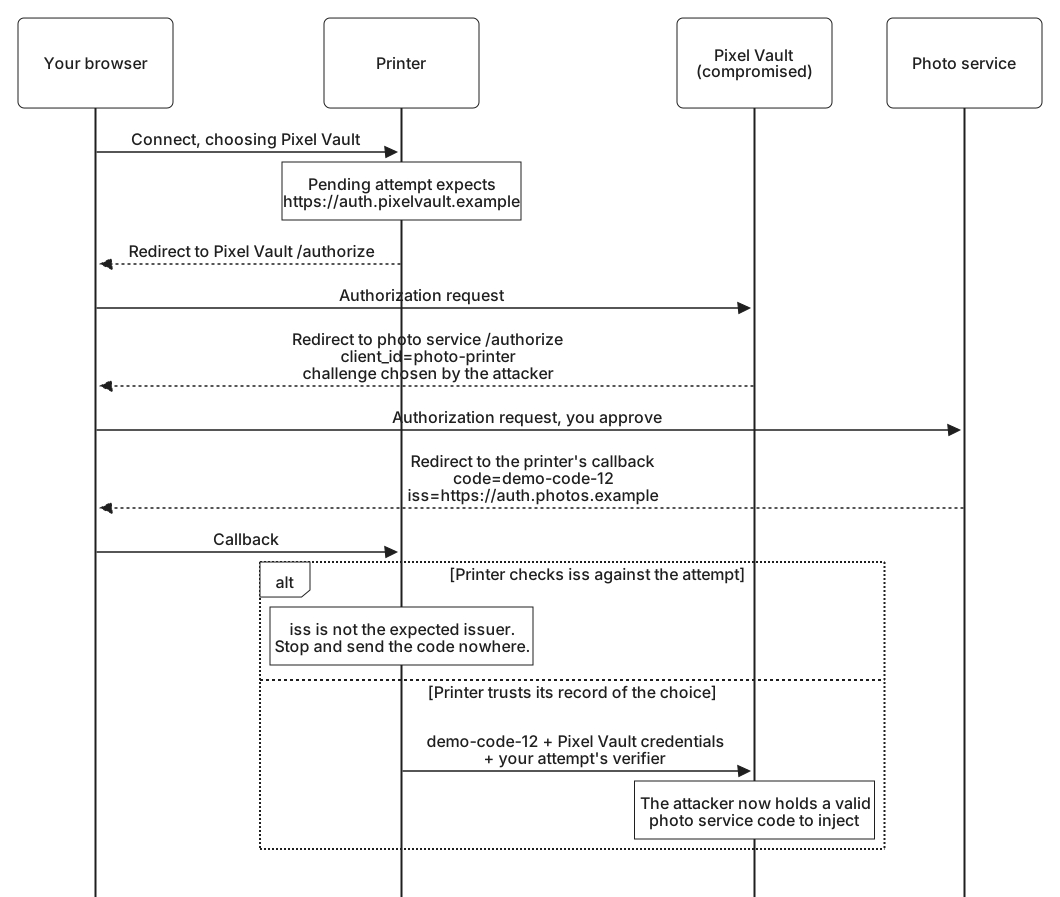
Before involving you, the attacker visits the printer in their own browser, starts a connection with the photo service, and keeps the code challenge from that authorization request. Then the attack runs like this:
- You select Connect and choose Pixel Vault, either freely or by following a forged Connect link like the one in Request correlation and CSRF. The printer records Pixel Vault as the expected service and sends your browser to Pixel Vault's authorization endpoint.
- Pixel Vault's server shows you nothing. It redirects your browser straight to the photo service, with the printer's photo service client ID and the challenge the attacker kept.
- You are signed in at the photo service. If you have approved the printer there before, it may not ask again. If it does, the screen names Photo Printer, the application you expected, and noticing that the service around it is the wrong one takes a careful eye.
- The photo service sends your browser to the printer's callback with a code for your photos.
- The state matches the pending attempt in your session. That attempt says Pixel Vault, so a printer that does not check who answered sends the code, with its Pixel Vault client credentials and your attempt's verifier, to Pixel Vault's token endpoint.
The redirect in step 2 is a request the photo service has every reason to accept: a registered client, its registered redirect URI, and a scope it may ask for. Line breaks are for display:
HTTP/1.1 303 See Other
Location: https://auth.photos.example/authorize
  ?response_type=code
  &client_id=photo-printer
  &redirect_uri=https%3A%2F%2Fprinter.example%2Foauth%2Fcallback
  &scope=photos.read
  &state=demo-attempt-12
  &code_challenge=xmiUF_fgTNQJwXjhc1uo-_bPhI81KTWScgJQdPExigQ
  &code_challenge_method=S256
The response in step 4 is entirely honest, and it even says where it came from:
https://printer.example/oauth/callback
  ?code=demo-code-12
  &state=demo-attempt-12
  &iss=https%3A%2F%2Fauth.photos.example
After step 5, the attacker holds a valid code for your photos at the photo service. They inject it into the attempt they started earlier, as Code interception and injection described. Because the challenge in your request was theirs, the printer's verifier for their attempt matches, and the printer redeems your code into the attacker's account. Against the phone app, the attacker would not even need an attempt of their own: they could forward the app's own challenge in step 2, and the app would hand over the matching verifier in step 5, which is everything a public client's code needs.
Notice what did not help. The state check passed, because the response really did arrive in the session that started the attempt. PKCE passed, because the attacker wrote the request the photo service saw. The redirect URI was registered and matched exactly. Mix-up needs a defense of its own.
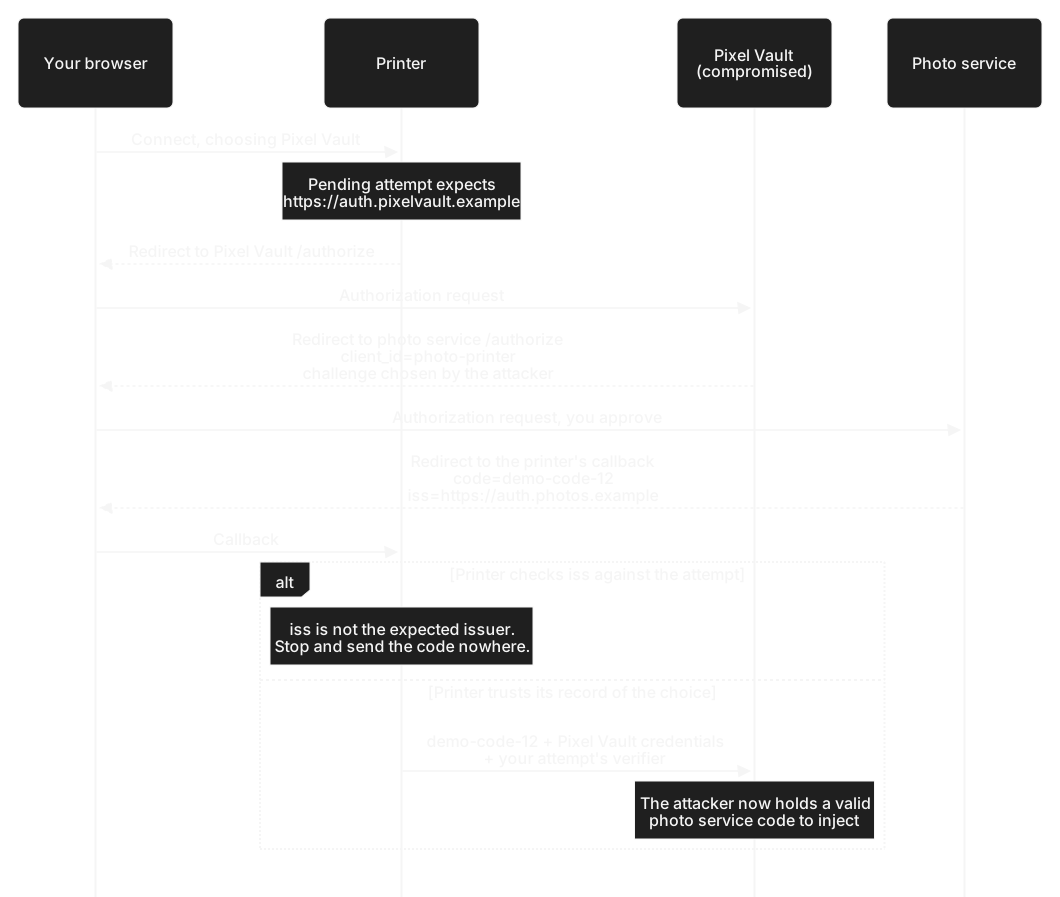
iss value in the response is what corrects it.
Defenses compared
Current guidance requires a client that works with more than one authorization server to defend against mix-up. Every defense starts from the pending attempt: for each authorization request, the client records the issuer it sent the request to, bound to the browser that started it. The issuer stands for the server's whole configuration, its authorization and token endpoints together, taken from trusted configuration or the server's published metadata. Recording only the address of an authorization endpoint is not enough, because a malicious configuration could pair the photo service's authorization endpoint with a token endpoint of its own.
| Defense | How it stops the attack | Limits |
|---|---|---|
Check the iss response parameter | The response names https://auth.photos.example, but the attempt expects https://auth.pixelvault.example. The printer stops at step 5, before the code goes anywhere. | Protects only responses from servers that send iss. |
| Use a distinct redirect URI for each issuer | The photo service keeps https://printer.example/oauth/callback, and Pixel Vault attempts must return to https://printer.example/oauth/callback/pixelvault. The photo service's response arrives at the photo service callback, where no Pixel Vault attempt is accepted, or the photo service refuses a request for the Pixel Vault address because it is not registered there. Either way, the attempt ends. | Needs a registration per server, and fails if an attacker can register the printer's Pixel Vault address for a client of their own at the honest server. |
| Let only the recorded issuer choose the token endpoint | The code can go only to the token endpoint configured for the expected issuer, never to one suggested by the response. | A rule for using the other defenses correctly, not a defense alone. In this attack, the printer used its own configured Pixel Vault endpoint. |
Current guidance says clients should use the iss check, or an issuer value carried inside a signed response, and that distinct redirect URIs should be used only when neither is available, because of the weakness in that row.
When a check fails, the printer ends the attempt, sends the code nowhere, tells you the connection could not be completed, and records a security event. It does not try again with the issuer the response named. A response can only confirm the expected issuer or end the attempt.
A client that works with a single authorization server is not exposed to mix-up. It becomes exposed on the day it adds a second, so the defense belongs in the same change that adds the second server. Advanced OAuth's Authorization response issuer identification group covers the rules for iss in detail, including metadata, error responses, and servers that do not send it.