Request correlation and CSRF
Most attacks on an OAuth client try to take something from you. The forged callback works the other way round. The attacker gives you something, an authorization code for their own photo account, and lets your browser deliver it to the printer.
Correlating requests and responses sketched this attack as a case of cross-site request forgery, or CSRF, in which another site causes your browser to send a request you did not intend and the receiving application treats it as yours. It also named the defense: a pending transaction bound to the browser session that started it. The details of that binding decide whether it holds, and an innocent change to a cookie setting can quietly break it.
A callback you did not start
Against an OAuth client, the forged request that matters is the callback. Current guidance describes CSRF in this setting as a request to the client's redirect URI that did not come from the authorization server in a flow you started, but was planted by someone else.
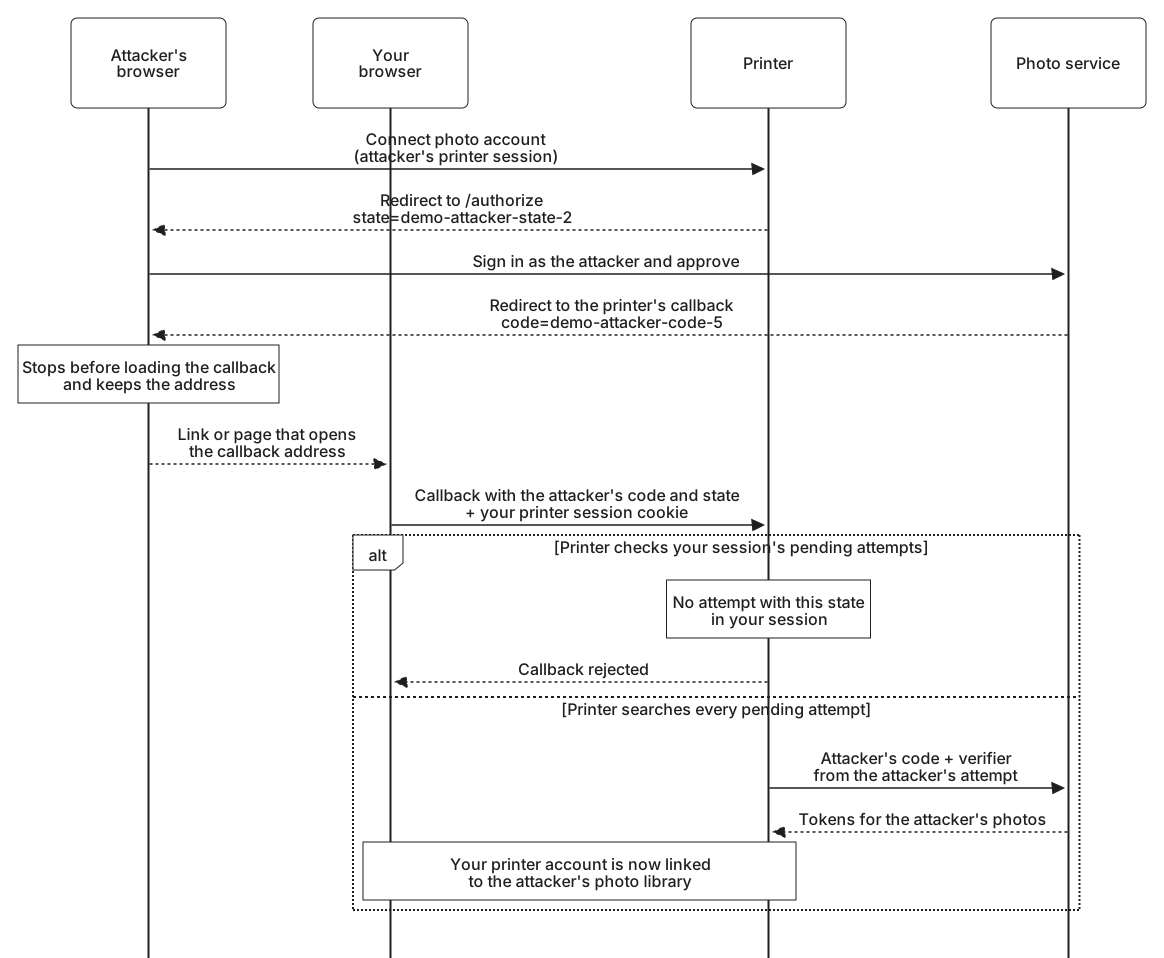
All domains, codes, and cookie values in these examples are fictional. Here are the attacker's steps from the earlier sketch, with the values the printer would see:
- They sign in to the printer with an account of their own and select Connect photo account.
- At the photo service, they sign in to their own photo account and approve the printer.
- The photo service redirects their browser back with a code for the attacker's photos. The attacker stops the browser before it loads the callback and keeps the address.
- They put that address where your browser will open it, such as a link in a message or a page that sends your browser there.
- Your browser requests the callback from printer.example and includes your printer session cookie, as it would for any visit to the printer.
The address the attacker kept looks exactly like an honest response:
https://printer.example/oauth/callback
  ?code=demo-attacker-code-5
  &state=demo-attacker-state-2
  &iss=https%3A%2F%2Fauth.photos.example
A printer that looks up demo-attacker-state-2 in one list of every pending attempt finds the attacker's attempt. It exchanges the code with the verifier saved in that attempt, so PKCE passes as well, and the printer attaches the result to the session that delivered the callback, which is yours. Your printer account is now connected to the attacker's photo library.
The harm grows with what the connection is used for. Suppose the printer also saves each finished photo book to the connected library as a new album, using the albums.create scope. The photos you upload from your computer for your next book end up in the attacker's account. And if the connection were also used to sign in, as OpenID Connect allows, the attacker could later sign in to your printer account with their own photo account.
What stops the forged callback
Session-bound state. Your browser arrives with demo-attacker-state-2. The printer looks for that value among the pending attempts of your session and finds nothing, because the attempt belongs to the attacker's session. It stops before any token request. This is why state must also be unpredictable and used only once: an attacker who could guess the value for an attempt you had just started would get past this check.
A PKCE verifier held in the session. A printer that relies on PKCE would finish the callback with the verifier from your session's pending attempt, if you had one. The attacker's code is bound to the challenge from the attacker's attempt, so the token endpoint rejects the exchange. If you had no pending attempt, there is no verifier to send and nothing to finish.
Correlating requests and responses attached a condition to relying on PKCE: the client must first confirm that the authorization server enforces it, for example from code_challenge_methods_supported in the server's metadata. The reason is a downgrade. The attacker can leave the challenge out of their own authorization request and receive a code with no binding at all. A server that then accepts the verifier your printer sends, without noticing that the code never had a challenge, completes the forged connection. Current guidance therefore says the authorization server must refuse a verifier presented for a code that was issued without a challenge.
OpenID Connect adds a third mechanism, a nonce that the client checks inside the ID token. All three work the same way underneath: the response must match something held for the browser that started the attempt, and the careless printer above lost that link when it searched every attempt at once.
Forged Connect and Disconnect
The callback is not the only printer address another site can trigger. If Disconnect works as a plain link, such as https://printer.example/account/photos/disconnect, any page that sends your browser there disconnects your photo account. You would find out in December, when the calendar fails.
A Connect address that takes its choices from parameters is riskier. A link to https://printer.example/connect?service=pixelvault&return_to=https://attacker.example/ starts a connection you did not choose, with a service the attacker picked and a destination the attacker set. If you have approved that service before, it may not show a consent screen at all, so the connection can complete without anything for you to notice.
Both are actions that change state, and both deserve the protection Backends for frontends gave the editor's own endpoints. Accept them only as POST requests, with SameSite cookies plus something another site cannot supply, such as a custom request header or a random value embedded in the printer's own form. Take the service from a fixed list of supported services, take the scope from the printer's own configuration, and validate any return destination. Disconnect should also revoke the printer's tokens, as Token revocation described.
The service choice matters more than it looks. Authorization server mix-up begins with a printer that sends you to a service the attacker controls.