Trust across systems
Signing in somewhere else
Your employer provides a photo library, an expense application, and a training portal. Instead of creating a separate password in each one, you use your work account. Each application needs a way to rely on authentication performed by your employer's identity service.
Federation establishes a way for systems to accept identity information from another trusted system. An identity provider authenticates the user and supplies information about that sign-in and the user involved. The receiving application, called a relying party in OpenID Connect and a service provider in SAML, decides whether to accept it.
What crosses the boundary
In a federated sign-in, you authenticate at the identity provider, perhaps using a password, a passkey, or another method. The photo library receives a protocol message it can validate instead of receiving your sign-in credentials. Information in the message is expressed as claims: statements about the user or authentication event.
Different protocols package this information differently. OpenID Connect, a widely used protocol for signing in to web and mobile applications, uses an ID token. Security Assertion Markup Language (SAML) uses an assertion, a structured statement from the identity provider. For example, your employer could send the photo library a SAML assertion identifying your work account, describing when you authenticated, and supplying attributes such as your department.
In either case, the application receives evidence of a sign-in performed elsewhere, and it needs to establish that it can trust that evidence before relying on it.
Where single sign-on fits
Single sign-on (SSO) describes the experience of signing in once and accessing multiple applications without repeatedly entering credentials. Federation can support that experience by allowing several applications to rely on the same identity provider.
Imagine signing in to the photo library at the start of your workday. Later, you open the training portal for the first time that day. The portal sends your browser to your employer's identity provider, which recognizes its existing session from the earlier sign-in. If that session meets the portal's requirements, the provider can return a new sign-in message for the portal without asking you to enter your credentials again. The portal then establishes its own session. The applications have not shared your password or copied each other's session cookies.
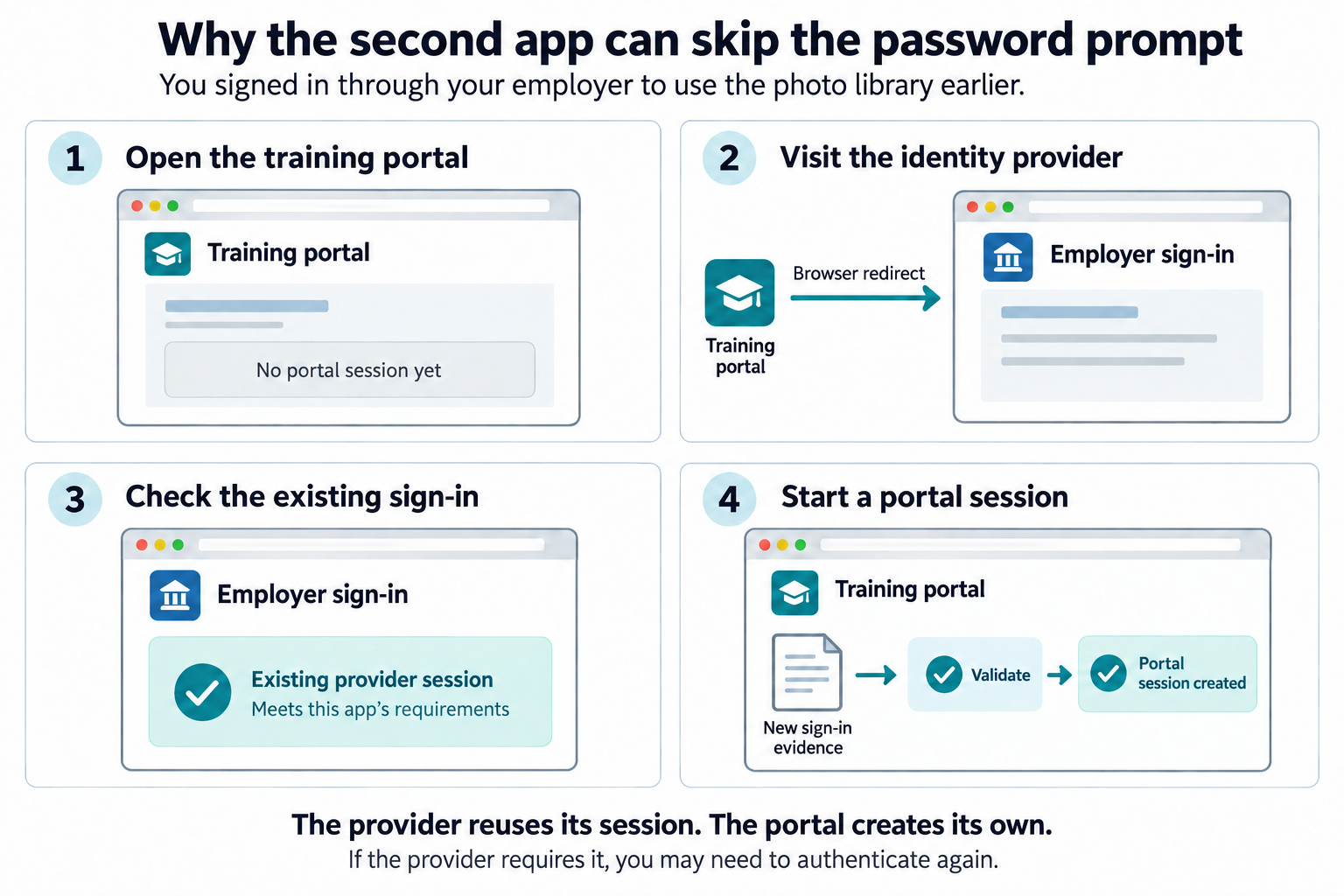
Policy may still require fresh authentication or an additional factor. Each application can also maintain its own session. Signing out of the photo library does not automatically end your session in the training portal or at the identity provider. Coordinating logout is a separate part of the design.
Connecting a sign-in to an account
Accepting a work sign-in does not tell the photo library which albums you may edit. The application still applies its access policies. First, though, it needs to know which local account that sign-in belongs to.
The identity provider includes an identifier that tells the application
which user signed in. In OpenID Connect, this is the sub
claim in the ID token. For example, its value might be
employee-4821. The photo library associates that value,
together with the provider that issued it, with your photo account.
Both matter: another provider could use employee-4821 for
a completely different user.
Linking accounts safely
Sometimes the account already exists. Suppose the photo library also lets people create accounts with an email address and password, and accepts sign-ins from more than one identity provider. When a federated sign-in arrives with an email address that matches an existing account, the address may look like an easy shortcut for making the connection. But consider a provider that lets someone enter any email address without checking it. An attacker could enter your address there. If the photo library automatically linked that sign-in to your existing account just because the addresses matched, the attacker could gain access to your photos. The text matches, but control of the account has not been established.
When using federation, a service needs to understand how its identity partners verify account information and authenticate users. Those processes should meet the service's security requirements for accepting a federated sign-in. Linking a federated identity to an existing account creates another way to access that account, so the application also needs a trusted process for confirming the connection.
For example, imagine connecting your work sign-in to an existing photo account. After you authenticate with your employer's identity provider, the photo application could ask you to sign in to your existing photo account and complete its registered MFA challenge. It could also send a confirmation link to the verified email address already stored on that account. These checks establish control of the existing account rather than relying only on an email address supplied by the partner.
The required checks depend on the application's security requirements, but the pattern is the same: authenticate to both accounts, and make sure the user clearly understands and approves the link before it is created.
Keeping account records current
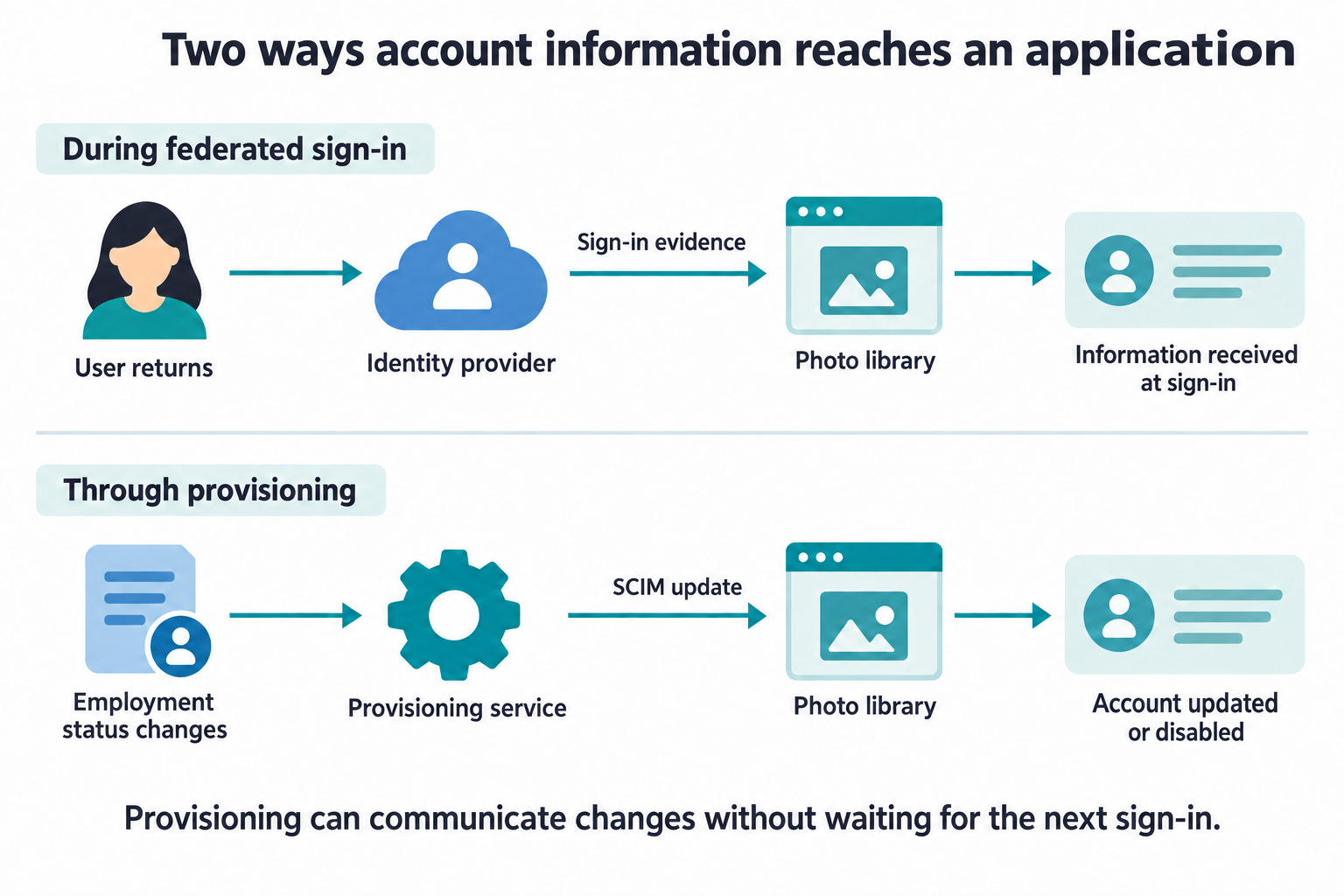
Federation does not by itself keep every application's account records current. When an application relies on information received during federated sign-in, it may only learn about changes when the user signs in again. If someone takes a long vacation, the application might continue holding the information from their last visit. That absence alone does not tell the application whether the person is on vacation, has changed roles, or is no longer an employee.
Provisioning addresses a different need: keeping accounts and their attributes aligned with the systems responsible for managing them, without waiting for another sign-in. The System for Cross-domain Identity Management (SCIM) provides a standard way to communicate changes such as creating an account, updating a department, or disabling an account when someone leaves.
For example, when an employer marks an employee as having left the organization, its provisioning service can send a SCIM request to disable that employee's account in the photo library. The photo library can then enforce that change without waiting for the former employee to return.
History of SSO follows how these trust relationships developed, from Kerberos to SAML and OpenID Connect, and Authentication policy and SSO looks at how an identity provider's authentication result, and the policy behind it, carries over to the applications that trust it. The OpenID Connect lessons then open up the messages themselves: Validating an ID token checks an ID token before it is trusted, Linking accounts confirms and removes a link, and Local logout and provider sessions begins the coordination of logout across applications. SCIM requests and responses shows the provisioning requests that create, change, and disable accounts.
Every exchange in this lesson, from a sign-in message to a provisioning request, carries evidence that someone could try to steal, alter, or reuse. Continue to Protecting credentials and messages to see how that evidence is protected.