Requesting stronger authentication
All domains, identifiers, and tokens in these examples are fictional.
At 10:15 UTC on 2 October, designer-42 opens a client's project in Lantern's portal and selects Download raw files. The designer has been signed in since 08:30 with a password and an authenticator app code. The rule for raw files, from Authentication context and methods, asks for something that sign-in did not provide.
A download that needs more
The download request reaches the portal's server, which makes two separate decisions. The first is permission: is designer-42 assigned to this project, with access to its raw files? If not, the answer is no, and no sign-in could change it. Only once permission is settled does the second question arise: does the authentication behind this session meet the download's requirement?
Lantern's rule for raw files has two parts. The sign-in must be in the class urn:lantern:acr:phishing-resistant, and it must have happened within the last fifteen minutes, so that a security key used at breakfast does not cover downloads all day. The portal's session for designer-42 at https://idp.lantern.example records what it needs to compare:
| Session field | Recorded | Required for raw files |
|---|---|---|
acr | urn:lantern:acr:mfa | urn:lantern:acr:phishing-resistant |
auth_time | 1790929800, which is 08:30:00 UTC | No more than 900 seconds old |
Neither part is met. This is the step-up authentication of Authentication policy and SSO combined with the reauthentication of Session age and reauthentication: stronger evidence, given recently. Rather than refuse, the portal records a pending step-up for this session. It holds which download was requested, the requirement, and the new attempt's state, nonce, and PKCE verifier. Then it sends the designer's browser to Lantern's identity provider.
Sending the person back
The request the portal builds carries both parts of the rule:
https://idp.lantern.example/authorize
  ?response_type=code
  &client_id=lantern-portal
  &redirect_uri=https%3A%2F%2Fportal.lantern.example%2Fsignin%2Fcallback
  &scope=openid
  &state=demo-portal-2
  &nonce=demo-portal-nonce-2
  &code_challenge=T0sO5nn95rTe6T6C4-oxfW6yhwJ-cQcpMGwYz4x9IWI
  &code_challenge_method=S256
  &max_age=900
  &claims=%7B%22id_token%22%3A%7B%22acr%22%3A%7B%22essential%22%3Atrue%2C%22values%22%3A%5B%22urn%3Alantern%3Aacr%3Aphishing-resistant%22%5D%7D%7D%7D
  &id_token_hint=eyJhbGciOiJSUzI1NiIsImtpZCI6ImxhbnRlcm4tMjAyNiIsInR5cCI6IkpXVCJ9...
Each addition carries one part of the requirement. The claims parameter is the essential acr request from Authentication context and methods, URL-encoded: it asks for urn:lantern:acr:phishing-resistant and nothing less. max_age=900 asks for a sign-in no more than fifteen minutes old. id_token_hint, shortened here, carries the portal's ID token from 08:30, so that Lantern's identity provider answers about designer-42 and no one else.
Lantern's identity provider has a session for designer-42, but that session's class is MFA. It asks for the designer's security key. The designer inserts the key and enters its PIN at 10:15:15, and the provider redirects back with a code, the same state, and its issuer. The portal exchanges the code with its PKCE verifier and receives a new ID token:
{
  "iss": "https://idp.lantern.example",
  "sub": "designer-42",
  "aud": "lantern-portal",
  "iat": 1790936120,
  "exp": 1790936420,
  "auth_time": 1790936115,
  "nonce": "demo-portal-nonce-2",
  "acr": "urn:lantern:acr:phishing-resistant",
  "amr": ["hwk", "pin", "mfa"]
}
First comes the validation every ID token receives: the signature with Lantern's key, the issuer exactly https://idp.lantern.example, lantern-portal in the audience, the times, and the nonce demo-portal-nonce-2 from the pending step-up. Then come the checks this attempt exists for:
- The issuer and subject match the session. A security key belonging to another designer must not unlock this designer's download.
- The
acris on the download's list, which holds onlyurn:lantern:acr:phishing-resistant. auth_timeis present and no more than 900 seconds old, allowing only a small clock tolerance.
The portal makes these checks even though it asked for an essential claim. Its request crossed the designer's browser, where it could have been edited into an ordinary sign-in, and the check is what makes the rule hold whatever reached the provider.
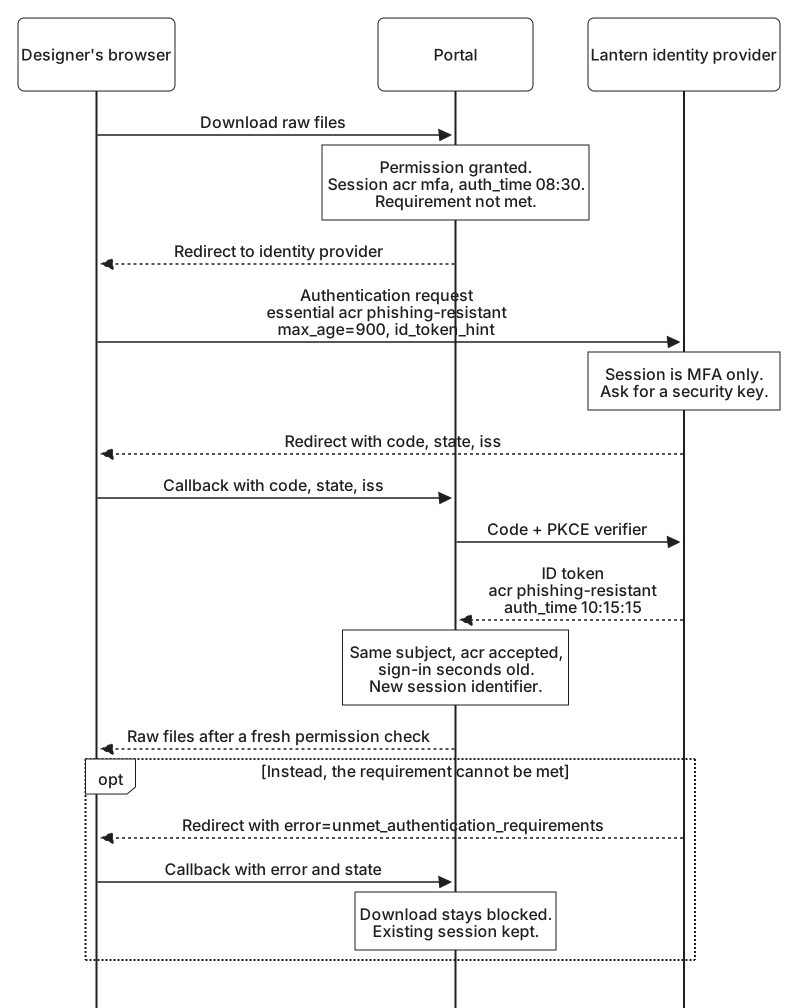
All three checks pass. The portal records the new acr, auth_time, and amr in the session and gives the browser a new session identifier, because the session now carries more authority than before. Staying signed in explained the same step at sign-in. Then it resumes the pending download, checking the designer's permission for the project once more. If the designer had been removed from the project in the minute it took to find the key, a successful step-up would not bring that access back.
A second raw download at 10:25 needs no new trip: the session's class is on the list, and the sign-in is ten minutes old. After 10:30:15 the fifteen minutes are up, and the next download sends the designer back again. Ordinary portal pages carry on throughout, because they accept either class and set no age limit.
When the provider cannot comply
Suppose the designer had left the security key at home, and has no other phishing-resistant method enrolled. Lantern's identity provider cannot meet an essential acr request, so it treats the attempt as a failed authentication and redirects back with an error:
https://portal.lantern.example/signin/callback
  ?error=unmet_authentication_requirements
  &state=demo-portal-2
  &iss=https%3A%2F%2Fidp.lantern.example
unmet_authentication_requirements comes from a short companion specification to OpenID Connect. A provider uses it when it cannot authenticate the person in the way the relying party required, and it is the expected answer when an essential acr request cannot be met. Not every provider supports it. Some report the same situation with a more general error, and a provider that does not honor essential claims may return a sign-in at a weaker class, which the portal's own check then rejects. If the designer simply cancels at the security key prompt, the answer is typically access_denied.
Whatever form the failure takes, the portal handles it the same way:
- It validates the response as it would a success, matching
stateto the pending step-up and checking the issuer. - It clears the pending step-up and leaves the download blocked.
- It keeps the designer's existing session. The 08:30 sign-in still meets the rules for ordinary pages, and a missing security key says nothing against it.
- It explains what the download needs: "Downloading raw files needs a security key or passkey. Try again with your key, or ask Lantern's IT team to set one up."
- It records the outcome for Lantern's security team: the action, the requirement, the error code, and a correlation ID for the attempt, without tokens or the request URL.
Two responses are tempting and wrong. One is to retry automatically with acr_values in place of the essential claim. That only turns the requirement into a preference. A provider that follows the step-up guidance in Handling unmet authentication requirements fails the request again, and one that treats the class as voluntary may complete the sign-in at the MFA class, which still fails the download's rule. Either way the designer is no closer to the files, unless the portal weakens its check too, which would undo the rule. The other is to send the designer straight back for another attempt, which turns a missing key into a loop of redirects. The designer should decide when to try again.
A sign-in by a different designer gets the treatment the printer gave it in Session age and reauthentication. The portal discards the pending download and ends the session, rather than letting someone else's security key strengthen this designer's session.
Here the portal decided that the download needed more, because the download happens in the portal. The Step-up authentication challenges lessons in Advanced OAuth, starting with When an API needs stronger authentication, followed the other case, where an API makes that decision: the requirement reached the client in the API's error response and traveled on to the authorization server in the same acr_values and max_age parameters. Wherever the requirement starts, the provider performs the stronger sign-in, and the party that set the requirement checks acr and auth_time in what comes back.
Each request in Controlling authentication worked with sessions that already existed: the photo service's session that a silent check relied on, the printer's session with its recorded auth_time, and the portal's session that now carries a stronger sign-in. Logout and session coordination turns to ending them, beginning with Local logout and provider sessions and the question of what signing out of one application actually ends.