Limiting what stolen access can do
A stolen session has a shelf life
At 09:14, a relay page at a look-alike address passed Riley's password and authenticator-app code to Cedar Inc.'s identity provider and kept the session cookie it issued. Riley never held that session, so signing out on Riley's own laptop could not end it. Whatever limits Cedar placed on its sessions were the only limits on the attacker's copy.
Staying signed in described two of them. An idle timeout ends a session after a period without activity. An absolute timeout ends it after a fixed total time, however busy it is. Against theft, they behave very differently. A thief who keeps using a session keeps resetting its idle timer, so the idle timeout mainly protects sessions nobody is using. The absolute timeout bounds a copy in active use: once it passes, the thief has to sign in, with the password and the second factor.
Applications that keep people signed in for weeks usually renew a session quietly. A renewal must not extend a stolen copy too, so it either stays within the same absolute limit or issues a new identifier and treats any use of the replaced one as a warning sign, the idea behind refresh token rotation.
Noticing a reused refresh token
Applications that call APIs face the same question with tokens. Access tokens usually last minutes, and the client obtains new ones with a refresh token, as The refresh token grant describes. That makes the refresh token the long-lived credential worth stealing.
Rotation turns a refresh token into something close to a single-use value. Each time the client uses one, the authorization server returns a replacement and marks the old one as used. The tokens descended from one original grant form a token family, and at any moment only one member of the family should be valid, held by one party. Refresh tokens and rotation covers how a server keeps that record. The same record is what lets it notice a copy.
Suppose a thief has copied refresh token R1 from the photo application's phone app and uses it first. The thief receives R2, and the app is left holding R1, which is now used. The next time the app refreshes, it presents R1. The server sees a used token come back and cannot tell which holder is legitimate. It does not need to. Reuse detection revokes the whole family, so R2 stops working for the thief, and the app asks the person to sign in again. If the app refreshes first, the roles swap: the thief's attempt with R1 is the reuse, and the same revocation follows.
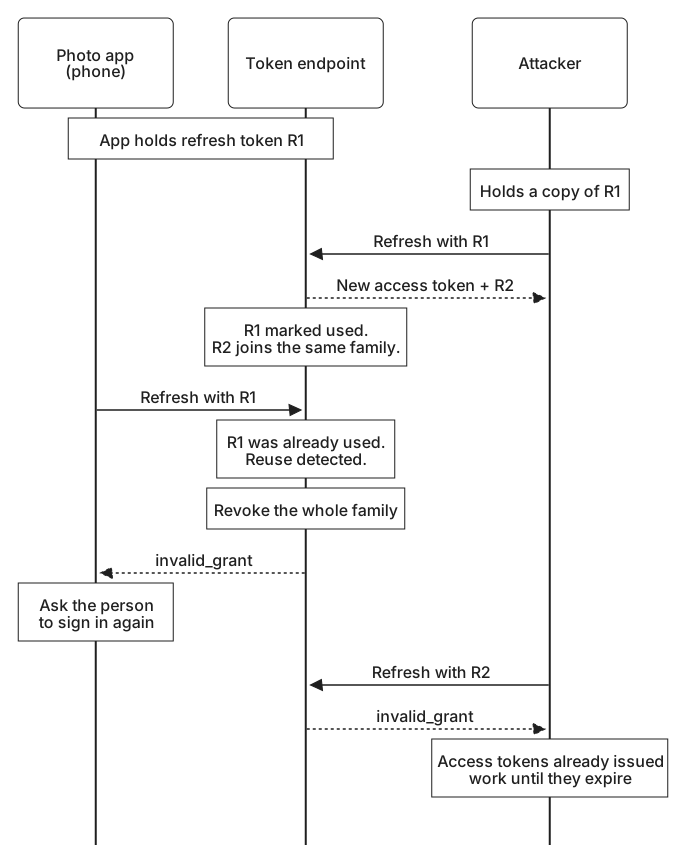
Reuse detection fires only when both copies are used. If the real app has been uninstalled, a thief can keep rotating undisturbed, so a family also needs an absolute lifetime and an expiry after a period without use. Access tokens issued before the revocation keep working until they expire, which is one reason they are kept short. Refresh token theft walks through each of these races at the token endpoint.
Narrowing what a token can reach
A copy can do only what the original could. A token whose audience is https://api.photos.example is refused by the storage service at storage.photos.example, because it was not issued for that service. A token with the photos.read scope cannot delete photos. Each restriction shrinks what a thief gains. It also limits the damage when the leak happens at an API: an API whose logs are exposed, or which is itself compromised, holds tokens that work nowhere else.
Narrow tokens have to be requested on purpose. A client that calls two APIs can ask for a separate token for each instead of one token that both accept, and a token that only needs to read albums should not also carry permission to share them. Scopes and audiences explains how these values are requested and checked.
Binding access to a key
Every limit so far reduces what a copy is worth without making it useless, because a bearer token is complete in itself. Protecting credentials and messages mentioned the alternative, a token bound to a key pair. When the authorization server issues a sender-constrained token, also called a proof-of-possession token, it records which key the client holds, and the API accepts the token only together with fresh proof that the sender holds the matching private key. The client keeps the private key, ideally in storage that will not export it, as Storing and using keys describes. Someone who copies the token from a log has the token but not the key.
Two standards do this for OAuth. RFC 9449, OAuth 2.0 Demonstrating Proof of Possession (DPoP), has the client sign a short proof for each request with a key pair it generated. RFC 8705, which defines mutual TLS for OAuth, binds the token to the client certificate used on the TLS connection. Binding a token to a key and Certificate-bound access tokens show how each one works.
The same idea can protect browser sessions. In a device-bound session, the browser creates a key pair when the session starts and keeps the private key in the device's secure hardware where it can. The server issues short-lived cookies and renews them only when the browser proves it still holds the key. Malware that copies the cookies gets something that stops working within minutes, because the key it would need to renew them cannot be copied out.
Binding has two limits. Malware still running on the device can ask the hardware to sign, so binding stops replay from elsewhere but not misuse from the victim's own machine. And binding protects only what happens after issue. In a relayed sign-in like Riley's, the identity provider issues the session to the relay in the first place, so the session would be bound to the relay's key. Only a sign-in method that checks where it is used, such as a passkey, stops that.
Predict what happens when each copy below is replayed.
Replay a copied token
Simulation. These replay attempts are made up, and answering sends nothing. Each record describes a copied credential and how it is replayed; predict the result.
Asking again before it matters
Some actions deserve an extra check whatever the state of the session: changing a password, adding a sign-in method, changing where payments go, or approving another application's access. Re-authentication asks the person to prove themselves again before the action proceeds. Authentication policy and SSO describes how a policy can require a recent sign-in or a stronger one.
Cedar had a check of this kind: adding an authenticator required a recent sign-in. At 09:20, from a hosting provider's address, the attacker used the stolen session to register an authenticator app of their own, and the check passed without a prompt because the session was six minutes old. A session stolen by a relay is always fresh, since the relay creates it at the moment of the theft. A recency check measures how long ago someone signed in, not who that someone was.
The check needed to ask how the session's sign-in was done, not only when. For actions that add a way into the account, a recent sign-in should count only if it used a phishing-resistant method, such as a passkey or a security key. Otherwise the service asks again, with one of those methods. The same rule lets the recovery walkthrough in Enrollment, replacement, and recovery accept a sign-in made moments earlier with a security key. Riley's 09:14 sign-in used a password and a code, so under that rule the 09:20 request would have stopped at a passkey prompt. Asking for the password and a code again would not have helped, because the relay could pass them along a second time, while a passkey will not sign for a look-alike address. The rule works only when the account has such a method enrolled, and when the policy refuses to fall back to a weaker one.
A notice through a separate channel helps as well. When a sign-in method is added, a message to the account's existing devices or verified email address gives the real owner a chance to react, even after the action has succeeded.
Choosing lifetimes people can live with
Every limit here has a cost for the people it protects. Sessions that end every hour mean signing in many times a day. People asked constantly learn to approve prompts without reading them, choose the quickest method on offer, and tick "remember this device" wherever they can.
The usual answer is to make the strict parts invisible and keep the visible parts rare. Access tokens can last minutes because refreshing them happens unnoticed. Re-authentication is saved for actions that change who can get in or where money goes, and signals such as an unfamiliar network can shorten a session or prompt a check in between.
| Credential or action | Example setting | What limits a stolen copy |
|---|---|---|
| Access token | 10 minutes | Expiry, audience and scope, and a key binding where supported |
| Refresh token | Rotated at each use; the family ends after 30 days, or after 7 days unused | Reuse detection ends the family |
| Session on a managed laptop | 10 hours absolute, 1 hour idle | The absolute timeout, and a key held by the device |
| Session on an unrecognized device | 2 hours absolute, 30 minutes idle | Shorter timeouts and a new-device notice |
| Adding a sign-in method | Accept a recent passkey or security-key sign-in; otherwise ask for one | Phishing-resistant re-authentication |
The right numbers depend on what each application protects. The photo application can keep a customer signed in on their own phone for weeks, because rotation and a bound key leave a copy little to work with. A system that releases payments can ask for a passkey before each one, because the people using it expect that check and a stolen session there would cost far more.