Code interception and injection
The forged callback in Request correlation and CSRF put the attacker's code into your session. Turn that attack around: a code issued for your photos has reached someone else, and they want to turn it into access.
How a code escapes
All domains, codes, and credentials in these examples are fictional. Codes travel through the browser, so they pass through places the client does not control.
Another app on the same phone. The printer's phone app can receive responses at its private-use scheme, example.printer:/oauth/callback. As Redirect URIs and client metadata explained, nothing stops a second app on the same device from registering that scheme too. When the operating system hands the response to the wrong app, the attacker holds the only copy of the code, and the real app never sees it. This is code interception: capturing a code on its way to the client.
Logs and history. A load balancer or web server that records full request addresses keeps the code in a line like this one, readable by anyone with access to the logs:
2026-10-01T09:00:41Z GET /oauth/callback?code=demo-code-7&state=demo-attempt-7&iss=https%3A%2F%2Fauth.photos.example 303Browser history on a shared computer does the same, and so does a callback page that leaks its address, as Redirect URI validation described. For these leaks, the printer still receives its own copy, so the attacker is racing a client that normally redeems the code moments after it arrives.
What the attacker does next depends on the client. A code issued to the phone app, photo-printer-app, can be sent straight to the token endpoint, because a public client needs only its client ID there. A code issued to the printer's website is harder to use. The website is a confidential client, and the attacker does not have its credentials. So the attacker gets the printer to redeem the code for them.
Injecting a stolen code
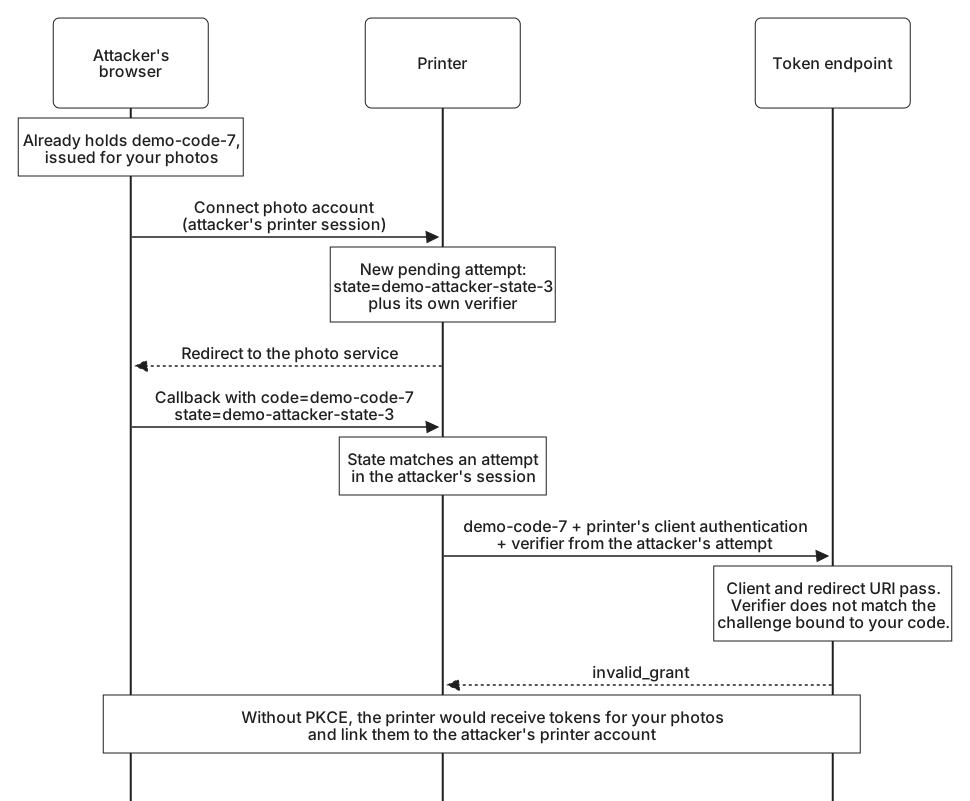
The attacker holds demo-code-7, issued to photo-printer for your photos during your attempt. Proof Key for Code Exchange (PKCE) outlined what comes next: authorization code injection, planting the stolen code in the attacker's own session at the legitimate client. Followed step by step, it looks like this:
- The attacker signs in to the printer with their own account and selects Connect photo account. The printer creates a pending attempt in the attacker's session, with a fresh verifier and the state
demo-attacker-state-3, and redirects their browser to the photo service. - Instead of continuing, the attacker opens the printer's callback with your code and their own state:
https://printer.example/oauth/callback
  ?code=demo-code-7
  &state=demo-attacker-state-3
&iss=https%3A%2F%2Fauth.photos.example- The printer finds the pending attempt. It belongs to the session that delivered the callback, so the state check passes, and the issuer is the one it expected.
- The printer sends
demo-code-7to the token endpoint with its own client authentication and the verifier saved in the attacker's attempt.
Look at what the token endpoint sees: the printer, correctly authenticated, presenting a code that was issued to the printer for the redirect URI it names. Client authentication cannot help, however strong the method, because the legitimate client is making the request. Without PKCE the exchange succeeds, and the printer links your photos to the attacker's printer account. The attacker can browse your albums in the printer's photo picker and order prints of them.
How PKCE stops both
Here is the token request from step 4. Everything in it is genuine, including the verifier, which is the right one for the attempt the printer is finishing:
POST /token HTTP/1.1
Host: auth.photos.example
Authorization: Basic cGhvdG8tcHJpbnRlcjpkZW1vLW9ubHktbm90LWEtcmVhbC1zZWNyZXQ=
Content-Type: application/x-www-form-urlencoded

grant_type=authorization_code
&code=demo-code-7
&redirect_uri=https%3A%2F%2Fprinter.example%2Foauth%2Fcallback
&code_verifier=demo_printer_verifier_for_the_attackers_attempt_5
The authorization server transforms the verifier and compares it with the challenge it stored with demo-code-7 when it issued the code during your attempt:
Challenge stored with demo-code-7:
qd-75t-gnweZAhIl6REjxxgFnPXGwvqYcxq3vlsaJYQ

BASE64URL(SHA256(demo_printer_verifier_for_the_attackers_attempt_5)):
B3RoGEA9YcBPFmS6QCvABccuXgS2gJ__hG2_VOQ3IWU
They differ, so the server answers invalid_grant, and the printer has nothing to attach to the attacker's session. The code belongs to one attempt and the verifier to another, and PKCE is exactly the check that notices.
Interception fails for a simpler reason. The app that captured the response has the code but not the verifier, which stayed inside the printer app and never travelled through the redirect. Your connection fails and you try again, but the intercepting app cannot redeem what it caught.
PKCE has one important limit. It works because the attacker cannot choose the challenge in your authorization request. When they can, the codes line up again: the attacker puts the challenge from an attempt of their own into your request, and a code issued to you then matches their verifier. That happens when a careless redirect matcher lets the attacker write your request, as in Redirect URI validation, or when a malicious server writes it on the client's behalf. The token endpoint's redirect URI check catches some of those cases, since a code issued for a different return address does not match the printer's callback, but PKCE is not a substitute for keeping the request and the response out of the attacker's hands.
A code presented twice
Errors and denied access gave the rule from the printer's side: the authorization server must refuse a code presented a second time and should also revoke the tokens already issued from it, which is why a retry cannot recover a lost token response. From the attacker's side, the same rule is a defense of its own.
Suppose the attacker reads demo-code-7 from the log a few seconds too late, after the printer has redeemed it, and presents it again, whether directly or by injection. The server refuses. It cannot tell which presentation was legitimate, only that a copy of the code exists outside the client that asked for it, so it also revokes what the code produced. If the attacker was faster, that takes their access away. If the printer was faster, it costs you one reconnection. Either way, the attacker comes away with nothing that lasts.
To make this work, the authorization server marks a code as used in the same step that issues its tokens, so two simultaneous requests cannot both succeed, and remembers which tokens came from each code. It also keeps codes short-lived. The original specification recommends a lifetime of no more than ten minutes, and many servers choose much shorter ones.
Every attack so far has relied on a code reaching the wrong party through the browser. In Authorization server mix-up, the printer hands its code to the wrong party itself.