Certificate-bound access tokens
The order service now authenticates to the print lab with its certificate. The token it receives, though, is still an ordinary bearer token. If the print lab's API writes it to a log, or a misconfigured proxy records it, anyone holding a copy can submit print jobs as the printer until it expires fifteen minutes later.
The certificate can close that gap too. The authorization server already knows which certificate the token was requested with, so it can tie the token to that certificate and let the API insist on seeing it again.
Binding the token to the certificate
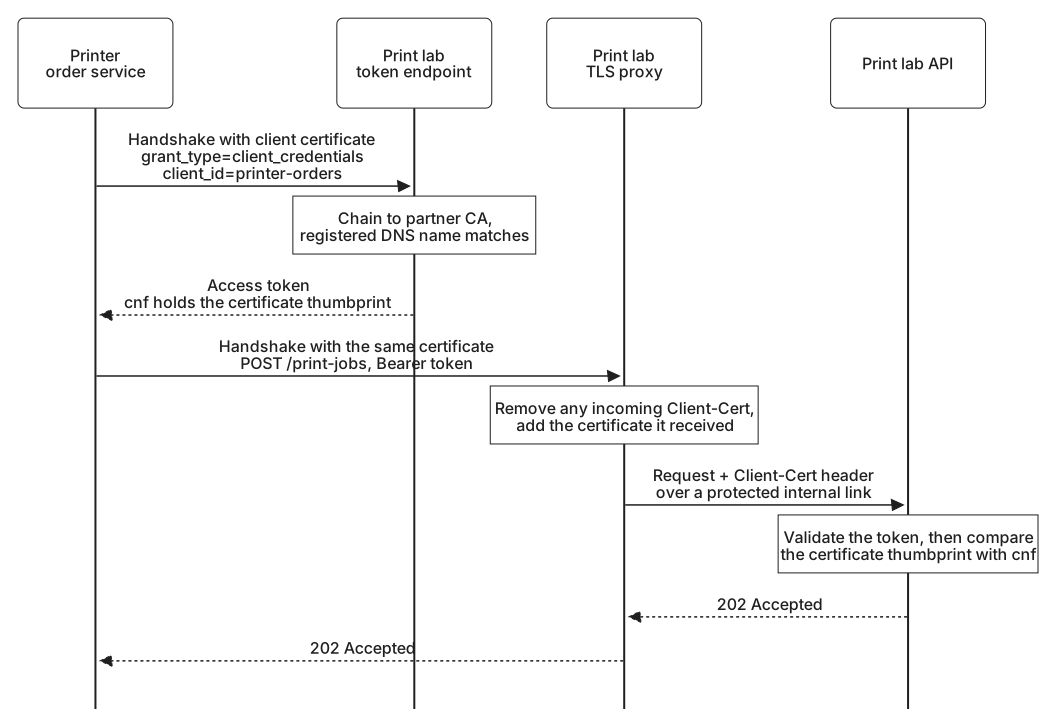
All domains, identifiers, and tokens in these examples are fictional. The order service's token request arrives over a mutual TLS connection, as in Authenticating a client with a certificate. The authorization server takes the client certificate from its TLS layer, calculates a SHA-256 hash of the certificate's binary DER encoding, and records that certificate thumbprint with the token. The response looks the same as before:
HTTP/1.1 200 OK
Content-Type: application/json
Cache-Control: no-store

{
  "access_token": "demo-lab-access-token-3",
  "token_type": "Bearer",
  "expires_in": 900,
  "scope": "print-jobs.write"
}
Unlike DPoP, mutual TLS adds no new token type. The order service sends the token in an ordinary Bearer header. What changes is the connection it must use. Decoded, the token's claims carry the binding:
{
  "iss": "https://auth.printlab.example",
  "sub": "printer-orders",
  "aud": "https://api.printlab.example",
  "client_id": "printer-orders",
  "scope": "print-jobs.write",
  "iat": 1790881200,
  "exp": 1790882100,
  "jti": "demo-lab-token-id-3",
  "cnf": {
    "x5t#S256": "upcMvPttuVZhYLYqzpqiqONaXZb2mD-2bd4QPsKEw2M"
  }
}
As with DPoP, the cnf claim says what a presenter of this token must prove. Its x5t#S256 member holds the certificate thumbprint, encoded as Base64url without padding. The token was issued at 19:00 UTC on 1 October 2026 and expires fifteen minutes later. If the token were opaque, the API would receive the same cnf member in an introspection response.
The print lab advertises the capability with tls_client_certificate_bound_access_tokens set to true in its metadata, and a client can declare the same setting in its registration to say it intends to use bound tokens. The binding does not depend on how the client authenticated. A client using private_key_jwt over a mutual TLS connection could receive a bound token too.
Checking the certificate at the API
To submit a job, the order service opens a mutual TLS connection to the print lab's API with the same certificate and sends:
POST /print-jobs HTTP/1.1
Host: api.printlab.example
Authorization: Bearer demo-lab-access-token-3
Content-Type: application/json

{ "order": "book-5562", "product": "hardcover-a4" }
The API validates the token exactly as it would any other. Then it asks its TLS layer for the certificate the client presented on this connection, calculates that certificate's SHA-256 thumbprint, and compares it with the token's cnf value. If they differ, or no certificate was presented, the request is refused:
HTTP/1.1 401 Unauthorized
WWW-Authenticate: Bearer error="invalid_token"
Someone who copied the token from a log can send it, but only over a connection of their own. They cannot complete a handshake with the order service's certificate, because that needs the private key, so whatever certificate they present has a different thumbprint.
The API does not need to validate the certificate's chain or check who issued it. That was the authorization server's job when it authenticated the client. The API only needs to know that this connection was made with the same key as the token request, and the handshake has already proved that the client holds the private key for the certificate it presented.
The API does need to request a certificate in the first place. TLS asks for one during the handshake, before the token arrives, so an API cannot decide to ask only when it sees a bound token. APIs that accept certificate-bound tokens usually request certificates on every connection, or serve those requests from a separate host name.
When a proxy ends the TLS connection
Many APIs never see a TLS handshake. A load balancer or reverse proxy in front of them ends the client's TLS connection and forwards each request to the application over a separate, internal connection. For mutual TLS, the proxy is now the party that receives the client's certificate, and it has to pass the certificate along.
It usually does so in a request header. A common header for this, Client-Cert, is described in RFC 9440. It carries the certificate's DER encoding in Base64, between colons:
POST /print-jobs HTTP/1.1
Host: api.printlab.example
Authorization: Bearer demo-lab-access-token-3
Client-Cert: :MIIB+zCCAaCgAwIBAgIGXBp+IgnUMAoGCCqGSM49BAMCMDMx...:
Content-Type: application/json
The certificate is shortened here for display. The application computes the thumbprint from this header instead of from its own TLS layer.
That header is now as powerful as the certificate itself, which creates an obvious attack. An attacker with a stolen token connects to the proxy, presents any certificate or none, and adds their own Client-Cert header containing the order service's certificate, which is not secret. If the proxy passes that header through, the API sees a perfect match. The mutual TLS specification leaves this hop to each deployment, so the defense is a matter of deployment practice, set out in the header's own description and in current security guidance. It comes down to three rules:
- The proxy removes or overwrites any
Client-Certheader that arrives from outside, and sends none at all when no client certificate was presented. - The application accepts the header only from the trusted proxy, never from anything else that can reach it.
- The link between the proxy and the application is protected against eavesdropping and tampering, for example by its own authenticated TLS connection or a private network only the proxy can use.
The danger is that skipping the first rule does not break anything visible. Honest requests still work, so a missing sanitizing step can go unnoticed until someone uses it.
Compared with DPoP
DPoP and certificate-bound tokens solve the same problem from different layers:
| Question | DPoP | Mutual TLS |
|---|---|---|
| Where is possession proved? | In each HTTP request, with a signed proof | In the TLS handshake, once per connection |
| What is the token bound to? | Any key pair the client generates | The key in the client's certificate |
What does cnf hold? | jkt, a JWK thumbprint | x5t#S256, a certificate thumbprint |
| How is the token sent? | The DPoP scheme, with a proof | The Bearer scheme, over a mutual TLS connection |
| Can a captured request be replayed? | Briefly, unless the server tracks identifiers or uses nonces | No. Each connection needs the private key |
| What about proxies? | Proofs pass through unchanged in HTTP headers | A proxy that ends TLS must forward the certificate safely |
| What about browser applications? | Works with keys created in the browser | Impractical, because browsers handle client certificates poorly |
Mutual TLS suits backends that already manage certificates, such as the order service, and its replay protection comes with the connection itself. DPoP suits clients that cannot easily hold certificates, such as the phone app and browser applications. Both make a copied token worthless on its own, and both tie the token to something that, sooner or later, will be replaced. For a certificate that moment is certain, because every certificate has an expiry date.