Phishing and relayed sign-ins
A convincing sign-in page
At 09:02 one morning, Riley, who works in Cedar Inc.'s finance team, receives an email saying a vendor has shared an invoice. Riley sees dozens of these a week. This one has a familiar vendor name, a reference number and a button labeled "View invoice". The button opens a page that looks exactly like Cedar's sign-in page, with the same logo, fonts and wording, and Riley's email address already filled in.
The address bar reads login-cedar.example. Cedar's real sign-in lives at login.cedar.example. One character separates them, a hyphen where a dot should be, and that character makes it a different site run by someone else. The page shows the usual padlock, because a look-alike site can obtain a valid certificate for its own name, as Protecting credentials and messages points out.
Training helps people notice some of these, but it cannot be the main defense. People sign in many times a day, often after being sent from one application to another, so a sign-in page appearing after a click is normal. Phone browsers shorten the address bar to fit. The email arrives on a busy morning and suggests that a payment is waiting. Comparing every address character by character, every time, asks for a reliability nobody has. Phishing, which Passwords and PINs introduced, works because it imitates something people do correctly all day.
Relaying the sign-in as it happens
A simple fake page collects the password, shows an error, and sends the person on to the real site. That was enough when a password was all a sign-in needed. Riley's account also requires a code from an authenticator app, and a code collected now is useless an hour later. So the page in Riley's email does not just collect what Riley types. It relays it.
A relay sits between Riley's browser and Cedar's real identity provider. When Riley's browser asks for the sign-in page, the relay fetches the real page from login.cedar.example and passes a copy back. Everything Riley enters goes to the relay, which forwards it to Cedar at once, and every response from Cedar comes back the same way. Because the attacker sits in the middle of a live conversation, this is called an adversary-in-the-middle attack.
At 09:14, Riley enters a password. The relay forwards it, and Cedar asks for a code. The relay shows Riley the same prompt, Riley opens the authenticator app and types the current code, and the relay forwards it while it is still valid. Cedar has received a correct password and a correct code, so it completes the sign-in and sets a session cookie. That response goes to the relay, which keeps the cookie and sends Riley on to an ordinary-looking page that never shows the invoice, with no error to raise suspicion.
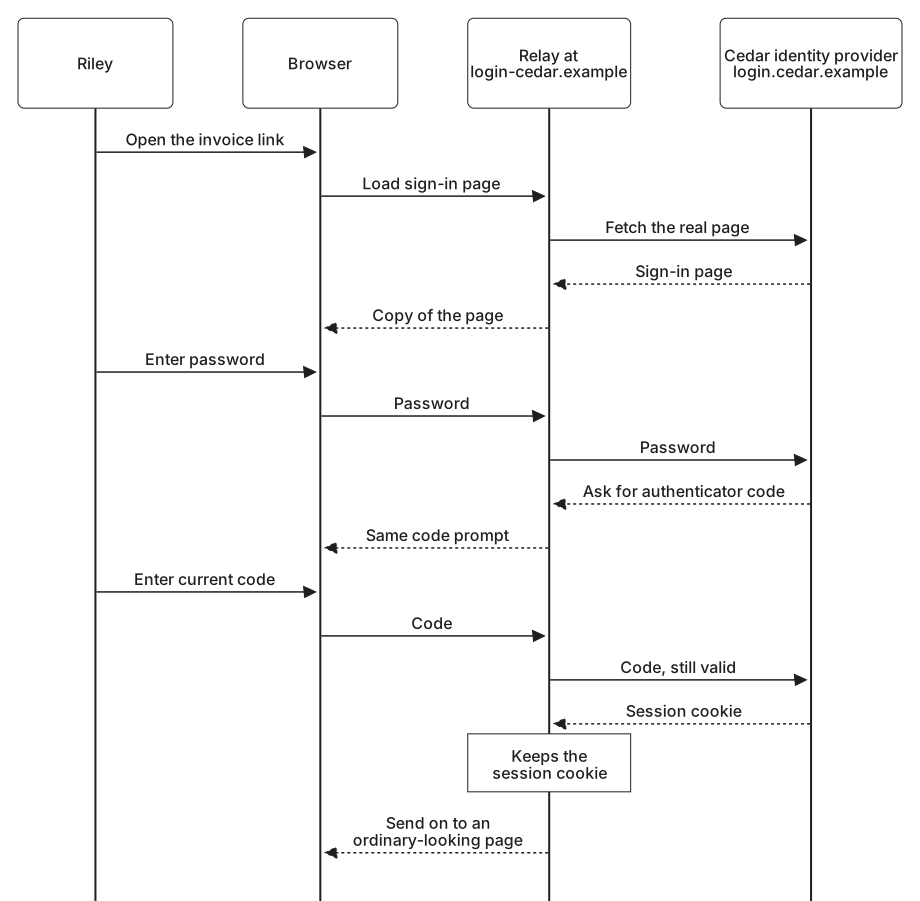
The cookie is what the attacker was after. As Staying signed in explains, holding a session identifier can be enough to use the session. At 09:20 the attacker uses it from another address on a hosting network and registers their own authenticator app on Riley's account. Riley's real sign-in had done all the work for them.
The relay still leaves traces. Cedar's identity provider recorded the 09:14 sign-in as coming from 203.0.113.24, an address at a hosting provider, not from Cedar's office network at 198.51.100.0/24, where Riley had signed in earlier that morning. Minutes later, the same session added an authenticator from another address, 203.0.113.57, on a network Riley had never used. That combination is exactly what Cedar's detection later catches, as Detecting identity attacks describes.
Why codes and approvals pass straight through
The relay did not break the authenticator app. Riley's code was genuine, calculated from the secret the app shares with Cedar, as Codes, links, and approval prompts describes. The code shows that someone has that secret right now. Nothing in its six digits says which website asked for it, so Cedar cannot tell a code typed at login.cedar.example from one typed at login-cedar.example and forwarded.
Every method that relies on a person carrying a value from one place to another behaves the same way. A text-message code can be read off the phone and typed into the relay. An approval prompt belongs to the sign-in the relay started at Cedar, so approving it completes the relay's sign-in. Number matching does not help either: the relay shows the real number on its copy of the page, and Riley enters it. Each of these methods asks Riley to confirm that this sign-in is Riley's, and Riley is right. What Riley cannot see is that the sign-in is being completed for someone else.
That leaves one check in the whole path: the person reading the address. It is the check the convincing page was built to defeat. A method that resists relays has to move that check out of the person's judgment and into software.
Credentials that check where they are used
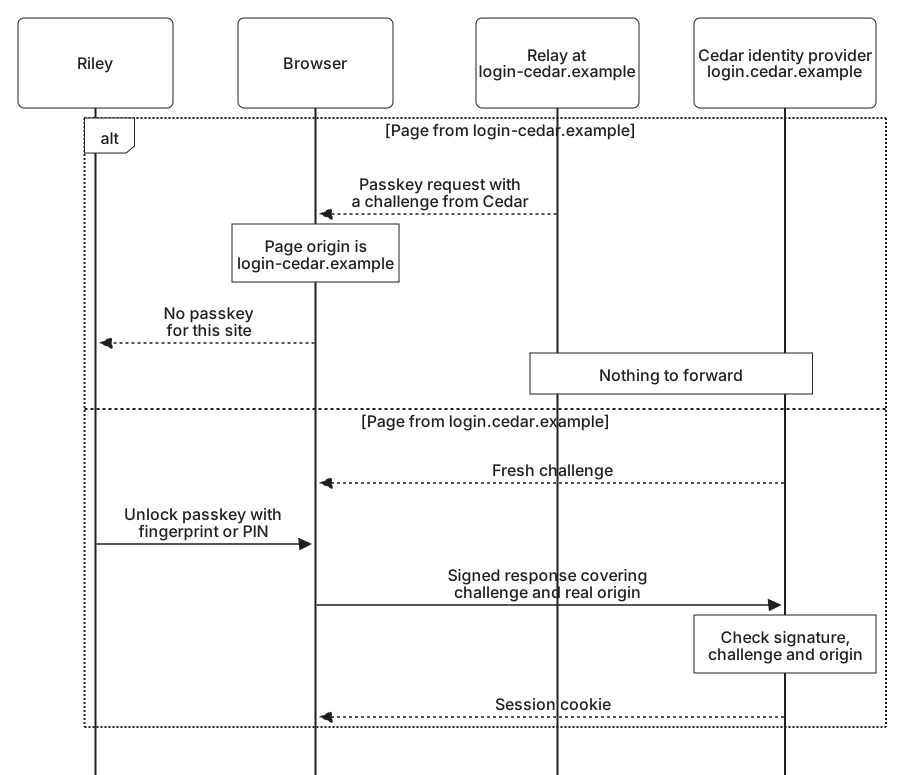
A passkey makes that move. Suppose Riley had registered a passkey with Cedar. It would be tied to Cedar's site, login.cedar.example, as Security keys, passkeys, and biometrics explains. At sign-in, the website asks the browser for a credential. The browser knows the real origin of the page it is showing, and it only looks for passkeys registered for that site. Riley does not have to read the address, because the browser already has.
At the relay, the page's origin is login-cedar.example. Riley's passkey does not belong to that site, so the browser has nothing to offer, however convincing the page looks. Even if the relay passes along Cedar's genuine challenge, the browser will not answer it for login.cedar.example from a page at another address. And every response a passkey produces includes the origin of the page it was used on, covered by the signature, so a response made at the wrong site would fail Cedar's check anyway. This is what phishing resistance means in practice: the credential checks where it is being used, so a perfect copy of the page gets nothing it can use.
A password saved in a password manager has a weaker version of the same check. The manager matches saved passwords to the site's address, so it does not offer Riley's Cedar password at login-cedar.example. That hesitation is a useful warning, but Riley can still open the manager, copy the password and paste it in, and a busy person often does. A passkey has no such override. Try the comparison with a few addresses.
Would this credential be offered?
Simulation. Suppose Riley has both a saved password and a passkey for login.cedar.example. These addresses are made up for practice, and checking an answer happens only in your browser and sends nothing.
The protection holds only while the account refuses phishable methods. If Riley's account still accepts a password and a code, a relay that gets no passkey can show "Try another way" and steer Riley toward them. Getting around MFA follows that kind of downgrade.
Phishing without a fake page
Some phishing never shows a fake page at all. In consent phishing, the email asks the person to approve a third-party application, perhaps one called "Invoice Sync" that promises to organize invoices. The link opens Cedar's genuine sign-in and a genuine consent screen. If Riley approves, the application receives access to read and send Riley's mail, the kind of delegated access described in Giving another application limited access, and no password or code ever passes through the attacker. At Cedar, the attacker approved Invoice Sync themselves at 09:31, using the stolen session. A consent email could have reached the same result without any relay.
In device code phishing, the attacker starts a device sign-in on their own equipment and sends the code to the victim with a plausible reason to enter it. The victim types it at the genuine verification page and signs in, and the attacker's device receives the access, as Device authorization shows.
A passkey does not help in either case, because the sign-in really does happen at Cedar's site. The defense moves to which applications people may approve and how the approval is presented, the subject of Attacks through apps and integrations.
Limiting the damage
The strongest fix is to replace phishable methods with phishing-resistant ones, starting with the accounts that would cost the most if taken over: administrators, finance staff who approve payments, executives, and the help desk itself. For those accounts, the phishable fallbacks have to go as well, or a relay will simply steer people toward them.
Until every account has moved, some sessions will still be stolen. Against a relay, the dependable fix is a phishing-resistant sign-in, because the relay's own device is the one that receives the session. A rule that accepts sign-ins only from managed devices, each proving itself with a key of its own, also stops a relay, but it covers only the devices and applications the organization manages. Binding a session to the device that created it does not change any of this, but it does stop a cookie copied by malware, as How sessions and tokens are stolen describes, from working anywhere else. Shorter session lifetimes for sensitive applications shrink how long any stolen cookie stays useful. The 09:20 step at Cedar shows one more place to act: adding a sign-in method should accept only a session whose sign-in was phishing-resistant, and otherwise ask for a passkey first, for the reasons given in Limiting what stolen access can do.
Signals help even when they cannot block. A successful sign-in from a hosting provider, for a person who always signs in from the office, is unusual. A session that changes address minutes after it was issued is more unusual still. Flagging these, asking for a passkey before the session can continue, and telling the person that a new authenticator was added to their account gives both the person and the security team a chance to act. A simple way to report a suspicious email helps too, because one report can reveal everyone else who received the same message.