How FAPI combines OAuth mechanisms
FAPI 2.0 invents almost nothing. Nearly every requirement in it takes a mechanism that an earlier group explained and makes it mandatory, or takes an option and removes it. The clearest way to see the combination is to follow one payment from start to finish.
Suppose Lakeside Bank's ecosystem adopts FAPI 2.0. Much of the Pay by bank flow from Writing authorization details stays as it was: the pushed request, the payment_initiation details, and the printer's client assertion signed with its key printer-2026-10. The most visible change is the token. A bearer token like demo-bank-access-token-3 is no longer allowed, because the profile requires every access token to be sender-constrained. Lakeside chooses DPoP for that and keeps private_key_jwt for client authentication. FAPI 2.0 lets each deployment make those two choices independently: mutual TLS or private_key_jwt to authenticate clients, and mutual TLS or DPoP to bind tokens.
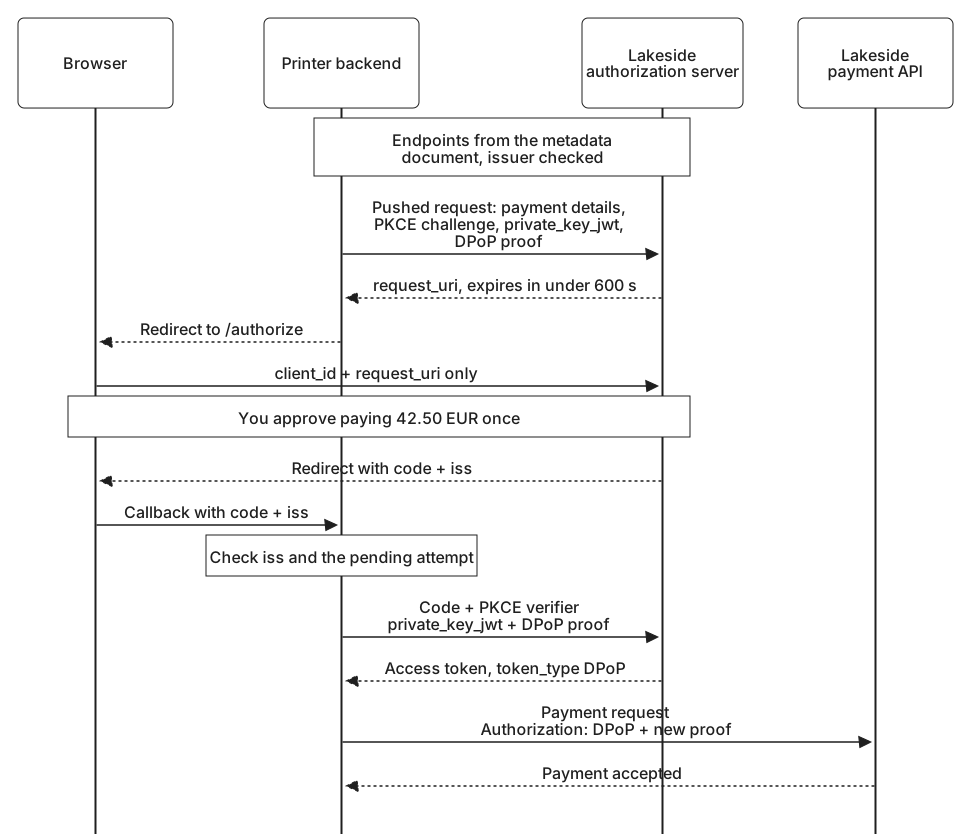
Pay by bank, step by step
All domains, identifiers, and values in these examples are fictional. You choose Pay by bank for your 42.50 EUR photo book and pick Lakeside Bank:
- Configuration. The printer reads Lakeside's metadata document from
https://auth.lakeside-bank.example/.well-known/oauth-authorization-server, using an issuer it holds in its own trusted configuration, and checks that the document'sissuermatches. Every endpoint below comes from that document. - Push. The printer's backend sends the entire authorization request to Lakeside's PAR endpoint:
response_type=code, its redirect URIhttps://printer.example/pay/callback, a PKCE challenge usingS256, and the payment details. It authenticates with a client assertion whoseaudis Lakeside's issuer identifier,https://auth.lakeside-bank.example, and attaches a DPoP proof so the authorization code will be bound to its DPoP key. Lakeside answers with arequest_urithat expires in under ten minutes. - Visit. Your browser goes to Lakeside's authorization endpoint carrying only the client ID and the
request_uri. Lakeside refuses any authorization request that did not arrive this way. - Approve. You sign in to Lakeside and approve paying 42.50 EUR to Photo Printer, once.
- Return. Lakeside redirects your browser back with a code and an
issparameter. The printer comparesissexactly with the issuer saved for this attempt before doing anything else. The code lasts at most 60 seconds and works only once. - Exchange. The printer redeems the code with another client assertion, its PKCE verifier, and a fresh DPoP proof from the same key. The access token comes back with
token_typeDPoP, where the earlier example receivedBearer. - Pay. The printer calls Lakeside's payment API with the token in the
Authorizationheader and a new proof. The API checks the token and its binding before acting.
The only part of this flow that passes through your browser on the way to Lakeside is short:
https://auth.lakeside-bank.example/authorize
  ?client_id=photo-printer-pay
  &request_uri=urn%3Aietf%3Aparams%3Aoauth%3Arequest_uri%3Ademo-lakeside-request-5
The amount, the payee, the redirect URI, and the PKCE challenge all traveled in the pushed request, directly from the printer's backend to Lakeside over an authenticated connection. Nothing the browser carries can change them.
Where each requirement comes from
Behind those steps are FAPI 2.0 requirements, and each one builds on an earlier lesson or group:
| FAPI 2.0 requires | Explained in |
|---|---|
| Confidential clients only. Public clients are outside the profile. | Public and confidential clients |
| Endpoints from the metadata document, with its issuer checked against a trusted value. | Authorization server metadata |
Every authorization request pushed with client authentication and a redirect URI. The browser carries only client_id and request_uri, which expires in under 600 seconds. | Pushed Authorization Requests (PAR) |
PKCE with S256. | Proof Key for Code Exchange (PKCE) |
response_type=code and nothing else. | The authorization request |
iss in every authorization response, checked by the client. | Authorization response issuer identification |
| Codes that work once and last no more than 60 seconds. | Redirects and authorization codes |
Client authentication by mutual TLS or private_key_jwt, with the issuer identifier as the assertion's aud, as a single string. | Mutual TLS, and Secrets and signed assertions |
| Sender-constrained access tokens only, by mutual TLS or DPoP. Servers using DPoP must support binding the code to the DPoP key. | Demonstrating Proof of Possession (DPoP), and Certificate-bound access tokens |
Access tokens in the Authorization header, never in a URL query. | Using access tokens |
| No password grant, and no open redirectors at the client or the server. | Choosing a flow, Redirect URI validation, and OAuth security best practices |
Signatures with PS256, ES256, or EdDSA using Ed25519, never none. RSA keys of at least 2048 bits and elliptic curve keys of at least 224 bits. | Token formats and validation |
Beneath all of it, every party uses TLS 1.2 or later and checks server certificates properly. Where scopes cannot express what the client needs, the profile recommends Rich Authorization Requests, which is why the payment already travels as payment_initiation details rather than a scope.
Where FAPI departs from habit
A few requirements go against what earlier lessons treated as normal, and each has a reason.
state is not the CSRF defense. Correlating requests and responses noted that a client may rely on PKCE instead of state once it knows the server enforces PKCE. Every FAPI server must, so the profile relies on PKCE alone, with the challenge generated for each request and bound to the browser session that started it. A client may still use state to carry its own application state.
Servers do not rotate refresh tokens. The refresh token grant presented rotation as a way to notice theft. FAPI 2.0 prohibits it except in extraordinary circumstances, such as a migration between systems. Its clients are confidential and its tokens are sender-constrained, so a stolen refresh token is already useless without the client's own credentials, and rotation adds only a failure mode: a client that loses the response carrying its new refresh token has no working one left. When a server must rotate, it has to let clients retry with the old refresh token for a limited time, and clients must be able to cope with rotation for those occasions.
Clocks get a stated tolerance. Even a fraction of a second of clock difference can make a JWT look as though it was issued in the future. Authorization servers must accept JWTs whose iat or nbf is up to 10 seconds ahead of their clock, and must reject any more than 60 seconds ahead, so that no one solves clock trouble by switching the check off.
Signed requests and responses are optional. Using JAR with PAR told the request half of this change: FAPI 1.0's advanced profile required signed request objects, and FAPI 2.0 replaced them with pushed requests that never travel through the browser. Protecting an authorization response told the response half: FAPI 1.0 Advanced protected responses with a signature, from JARM or from an ID token, while FAPI 2.0 reduces the response to a code protected by PKCE, iss, and a short lifetime. Ecosystems that also need non-repudiation, a record that the printer itself asked for this exact payment, can add FAPI 2.0 Message Signing, which signs the pushed request with JAR, the response with JARM, and introspection responses as JWTs.
None of this is a new protocol. It is the OAuth of the earlier lessons, with the choices made once and written down. Whether a particular authorization server or client actually makes every one of those choices is a separate question, and only testing can answer it.