Locating its authorization servers
The photo API's metadata document is short. Most of it answers questions the printer used to settle with a developer's help: which authorization server to ask, which scope to request, and how to present the token it receives.
Reading the resource document
All domains and values in this example are fictional. The complete document is:
{
  "resource": "https://api.photos.example",
  "authorization_servers": ["https://auth.photos.example"],
  "scopes_supported": ["photos.read", "albums.create", "photos.delete"],
  "bearer_methods_supported": ["header"],
  "dpop_signing_alg_values_supported": ["ES256"],
  "dpop_bound_access_tokens_required": false,
  "resource_name": "Photo API",
  "resource_documentation": "https://photos.example/developers/api"
}
resource is the only required member. It repeats the identifier the document describes, and the client checks it before trusting anything else in the document.
authorization_servers lists the issuer identifiers of authorization servers whose tokens this API accepts. An API may leave some out, and an API whose authorization servers cannot be listed in advance omits the member entirely.
scopes_supported lists the scopes used to request access to this API. As with the authorization server's list, it shows what exists, not what to ask for. The printer still requests only photos.read, because a photo book needs nothing more.
bearer_methods_supported says how the API accepts bearer tokens. The defined values are header, body, and query. This API accepts only the Authorization header, which is also the method Using access tokens recommended. If the member were missing, a client could not conclude anything either way.
The two DPoP members say that the API accepts DPoP proofs signed with ES256 but does not insist on them, because dpop_bound_access_tokens_required is false. The phone app's DPoP-bound tokens work here, and so do the website's plain bearer tokens. An API that set the value to true would refuse any token not bound to a key.
resource_name and resource_documentation are for people. Like a client's name in its registration, described in Redirect URIs and client metadata, the resource name is whatever the API's operator chose to type.
From resource to authorization server
The issuer in authorization_servers is exactly the starting point that Discovering server capabilities needed. The printer builds https://auth.photos.example/.well-known/oauth-authorization-server from it, fetches the document, checks that its issuer matches, and reads the endpoints. Put together, discovery runs in this order:
- Call the address you were given, without a token, and receive a challenge naming the metadata address.
- Fetch the API's metadata, check its
resourcevalue against the address called, and decide whether to use the authorization server it lists. - Fetch that authorization server's metadata and check its
issuervalue. - Run the authorization flow, then call the API with the new access token.
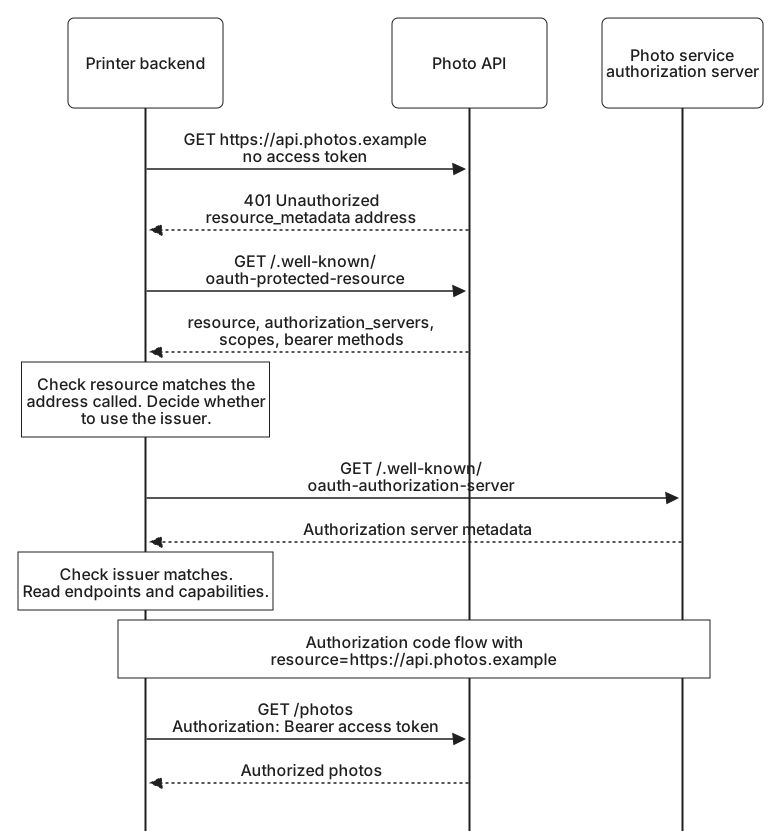
When an API lists more than one authorization server, the client chooses. A list does not oblige a client to use any of the servers on it. The client uses one that it trusts and where it has, or can obtain, a client registration. An authorization server's own metadata can also list the resources it serves, in a protected_resources member. Where an application relies on both lists, it can check that they agree.
Requesting a token for this API
With the endpoints in hand, the printer starts the authorization code flow it already knows. The request names the API it wants access to with the resource parameter from Selecting the intended resource, so the token it receives is restricted to that audience:
https://auth.photos.example/authorize
  ?response_type=code
  &client_id=photo-printer
  &redirect_uri=https%3A%2F%2Fprinter.example%2Foauth%2Fcallback
  &scope=photos.read
  &resource=https%3A%2F%2Fapi.photos.example
  &state=demo-attempt-7
  &code_challenge=qd-75t-gnweZAhIl6REjxxgFnPXGwvqYcxq3vlsaJYQ
  &code_challenge_method=S256
Naming the resource matters more for a client that follows APIs to authorization servers than for one configured by hand. RFC 9728 recommends audience-restricted tokens for any client that expects to use more than one protected resource, as a client that follows APIs to their authorization servers does. Without them, a client that takes directions from APIs could be steered into requesting a token that some other API would also accept.
After the code exchange, the printer calls the API again, this time asking for GET /photos with the access token, and the API returns your photos.
Every document along the way was written by someone else and taken at its word. Trust and metadata validation looks at which of those words a client can safely act on.