Linking accounts
All domains, identifiers, and tokens in these examples are fictional.
You opened your printer account in November 2025, long before the printer offered a photo sign-in. It is account 8812, registered with [email protected] and a password, and it holds your photo books, your past orders, and your delivery address. So when the registration page asks whether to create a new account or connect an existing one, you choose to connect.
The printer can see that the email address the photo service reported, [email protected], is the address on account 8812. Linking the two on that basis alone would be easy. Trust across systems showed why the shortcut fails when a provider never checks addresses. The harder cases are the ones where the provider did check.
Two ways into one account
Linking adds a row to the sign-in identities table for an account that already exists: the pair https://auth.photos.example and user-2048, pointing at account 8812. Afterward, either your password or your photo account opens the same account, with the same orders and addresses. Later you might link your mail service account as a third way in, with its own row for https://accounts.mail.example and a94f1c07e2.
Every row is a way into the account, so adding one is the same kind of change as enrolling a new security key. Enrollment, replacement, and recovery set the rule for that: a new way in needs proof from the person who already controls the account, and knowing its email address is not proof. Whoever links has to show control of both sides, the photo account through the validated ID token and account 8812 through its own sign-in.
Why matching emails is not enough
Suppose the printer linked automatically whenever a sign-in arrived with email_verified set to true and an address matching an existing account. Each of these situations would then give a printer account to the wrong person:
| Situation | What the printer sees | What actually happened |
|---|---|---|
| Someone registered first | A verified photo sign-in for [email protected], and a printer account with that address | Before you ever used the printer, someone else registered [email protected] there with a password of their own. Nobody confirmed the address, and the printer kept the account anyway. |
| The address was reassigned | A verified mail service sign-in for [email protected] | You stopped using the address, and the mail service later gave it to someone new, under a different subject. |
| The verification is old or weak | A photo sign-in with email_verified set to true | The provider checked the address once, years ago, by a process the printer has never assessed. |
The first case is known as account pre-hijacking, and it surprises people because nothing about the photo sign-in is wrong. You sign in with your photo account, the printer links you to what looks like your account, and you add a delivery address and a card. The person who created the account still knows its password. They sign in whenever they like and see everything you added. The printer joined a genuine sign-in to an account whose owner it had never established.
The defense starts with the printer's own records. An account whose address the printer never confirmed has no owner the printer can name, so it is never a candidate for linking. The flow below would have stopped you anyway, by asking for a password you never set. Resetting that password through your mailbox would then give the account to whoever controls the address, which is you, and should end every session its creator still had.
The second case is the reuse Claim stability and privacy warned about. The new holder of the address has their own subject at the mail service, so nothing but the email connects them to account 8812, and only email matching would let them in.
The mail service is a closer call, because it runs mail.example. Its verification describes a mailbox it operates, which is stronger evidence than another provider can offer. It still says nothing about who created the printer account with that address, and it is the very provider that can give the address to someone else, so the printer asks for proof here too.
A safe linking flow
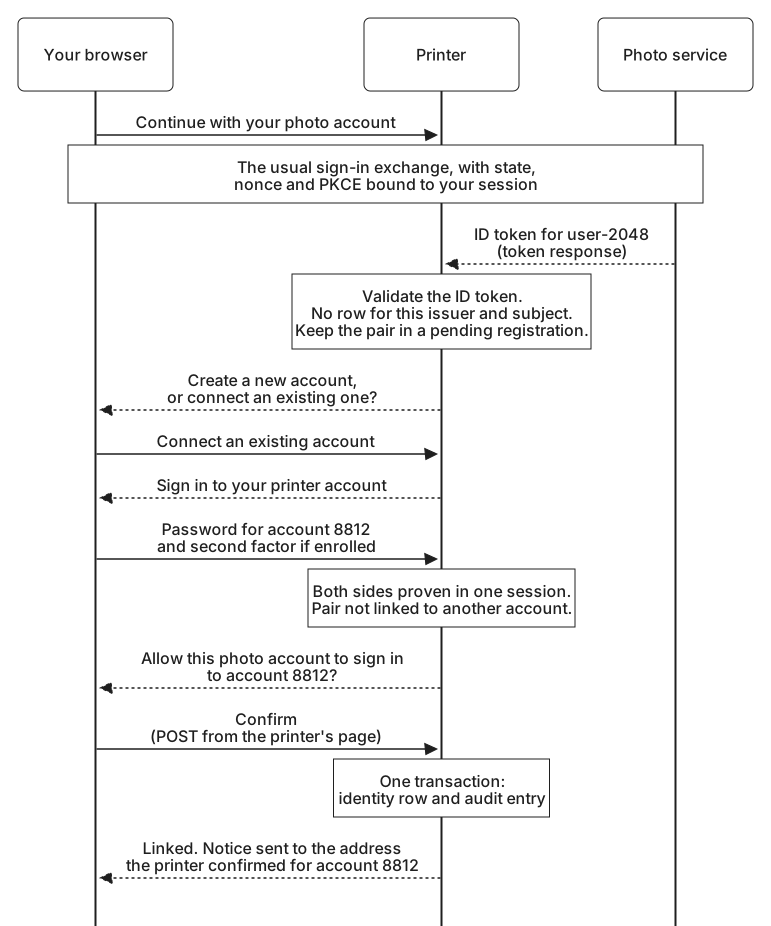
Your path through the printer shows the safe version. Both sides are authenticated in the same browser session before anything is written:
- The photo side. Your photo sign-in completed normally, with
state, the nonce, and the full ID token validation. The validated pair waits in the pending registration attached to your session. - The printer side. You choose to connect an existing account, and the printer asks you to sign in to it with its own method: your password, and the second factor if you have enrolled one. The account to be linked is the one this sign-in proves, not one picked by the email match or named in a form field.
- A check for conflicts. The printer confirms that the pair is not already linked to a different printer account. If it were, the printer would stop and explain rather than move it, because moving a way in from one account to another needs proof for both accounts.
- Confirmation. The printer says plainly what will happen: allow the photo account Robin Park, [email protected], to sign in to this printer account. Your answer is a POST from the printer's own page, protected against cross-site requests.
- The record. In one transaction, the printer inserts the identity row and an audit entry recording the account, the issuer and subject, the time, and how each side was authenticated.
- Notice. It emails the address it confirmed for account 8812, which need not be the address the photo service reported, and lists the photo account under Sign-in methods with a Remove button.
Starting from the other side works the same way. If you were already signed in with your password and chose Link photo account under Sign-in methods, the printer would ask for the password again unless you had just entered it, then start a new authentication request with fresh state, nonce, and PKCE values. The pending attempt records that it is for linking, and the account to link comes from your session, never from anything in the request.
Request correlation and CSRF showed an attacker delivering a callback for their own photo account into your browser. Against a linking flow, success would give the attacker's photo account a permanent way into your printer account. The session-bound state and the nonce stop that forged callback. The confirmation is a second barrier, since no link is created without you seeing which photo account is being added, and the notice tells you if one was created anyway.
Removing a link
Some months later, with your mail service account linked as well, you decide to stop signing in with the photo one. Removing a link takes away a way in, and it deserves nearly as much care as adding one.
The printer asks you to prove control again before removing anything, since a session left open on a shared computer should not be enough to change how the account is protected. Asking the provider itself for a fresh sign-in, instead of the printer's own password, is covered in Session age and reauthentication.
It also makes sure a way in remains. You still have a password and the mail service, so removing the photo account is safe. A customer who signed up through the photo service and never set a password has only that one row, and removing it would leave an account nobody can open. The printer refuses that removal until another method exists.
Then it deletes the row, writes an audit entry, and sends a notice, as it did for the link. It can also end any printer sessions that were opened through the removed identity, which is one reason the session record in Establishing an application session notes how each session began.
Some things stay as they were. The sign-in link and the photo connection that feeds your calendar are separate records, so stopping photo sign-in does not cancel December's calendar, and disconnecting the calendar does not lock you out. Removing the link also tells the photo service nothing: the printer stays on your photo account's list of connected applications until you remove it there.
The next time anyone signs in with user-2048, the lookup finds no row, and the printer treats it as a first sign-in: create an account, or connect an existing one by proving control of it. The matching email is no more a reason to restore the link quietly than it was to create it.